TL;DR
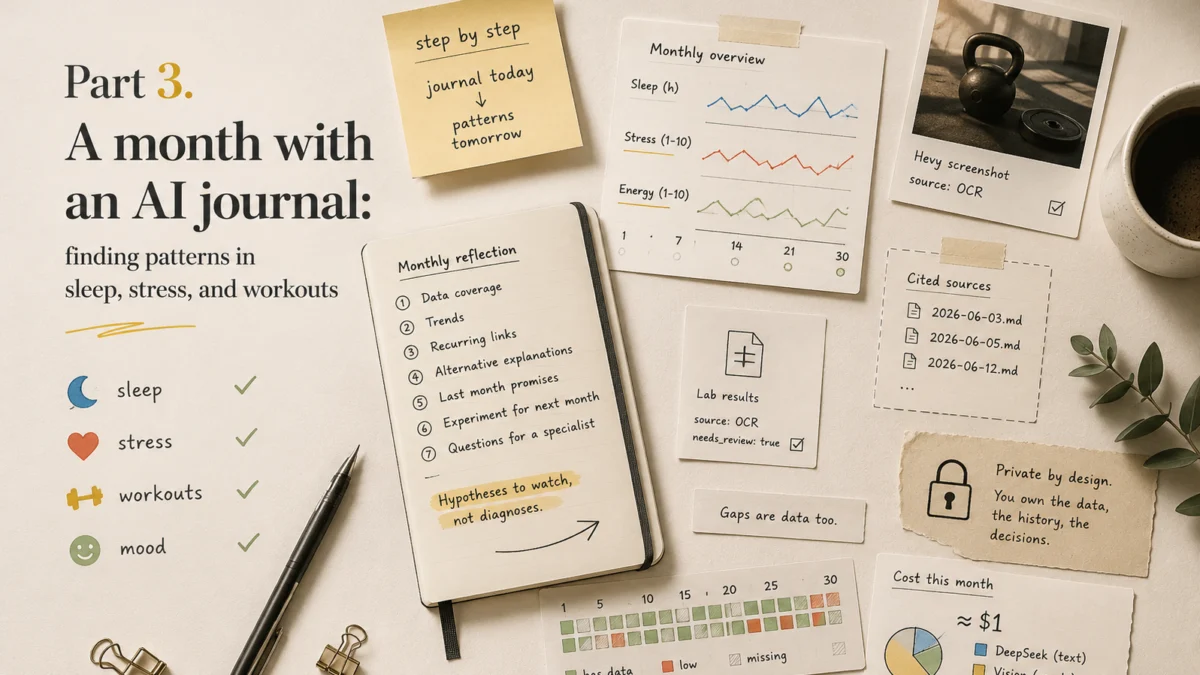
- The value of an AI journal doesn’t show up on install day, it shows up a month later, when the entries start adding up into patterns: sleep, stress, workouts, mood.
- The agent doesn’t “remember the whole vault” automatically: an honest monthly reflection requires explicitly assembling context from your files, and I show how.
- The links you find are hypotheses to watch and questions for a specialist, not diagnoses.
On the first evening after setup, I opened the journal folder several times to make sure the file had really appeared. The next day I checked the commit. A week later I noticed I wasn’t opening the folder after every entry anymore. And another month later I couldn’t remember when I’d last checked the logs manually. That was a good sign: the tool had disappeared from my attention and left only the habit.
In the first article I described how an old gaming laptop became a home AI server, and in the second we built the system from scratch. This article is about what happens next, once the “it works!” thrill wears off but the 9 PM evening reminder keeps arriving: daily operation, and AI journal analysis once you’ve accumulated enough entries.
Part 3 of 3: operation, reflection, and cost
What changes after the first month
The first week, you play with the system: you send voice notes, watch the vault grow, show the bot screenshots. By the third week the novelty has evaporated, and what’s left is the bare mechanics of a habit: a buzz at 9 PM, forty seconds of dictation, a confirmation, done. At that point the system’s most important quality isn’t the model’s intelligence, it’s the absence of friction. If I had to open an app and fill out a form, I’d have quit already.
Somewhere after the first month I started asking the journal questions instead of just filing entries into it. Not ‘how am I today’ — I know that already — but ‘why am I exhausted by Thursday for the second week in a row’. One day has no answer to that question. Thirty days do.
Let me show it with a composite example from my own practice, with the details changed so I’m not publishing real entries. Three nights in a row of broken sleep: Wednesday, Thursday, Friday. On their own each night looked like a fluke: it was hot, I stayed up for one more episode, I just couldn’t sleep. Then on Saturday a workout was unexpectedly harder than usual. In the moment it looked like “a bad day at the gym.” In the journal, the accumulated sleep debt became a working hypothesis I could test against the following weeks, not a ready-made cause.
One other entry from that same week stuck with me. I dictated: “I don’t feel stressed, but everything is annoying me.” The system didn’t log high stress, because the scale anchors (we defined them in the second article) tell these states apart, and the reflection surfaced a phrasing I’ve remembered ever since: sleep debt eats your emotional buffer. Stress low, irritability high, and those are different metrics with different causes. No health app with a “rate your stress from 1 to 10” form would ever have shown me that difference.
A daily workflow without perfect data
A realistic picture of my day with the journal:
- in the morning after the gym: a workout screenshot from Hevy (or any other tracker, if your stack is different);
- during the day: nothing, the system stays quiet;
- in the evening at 9 PM: a reminder, a 40 to 60 second voice note, sometimes a calorie summary from YAZIO or a similar app;
- after the note: one short follow-up from the bot, if I forgot something required.
That last point matters more than it looks. If I didn’t mention my weight, the bot asks exactly one thing: “You didn’t mention your weight. Did you weigh yourself today?” Not a questionnaire, not a list of five missed fields, one question about the single most important one. If I don’t answer, the field stays empty with a needs_review flag, and that’s correct: an empty value is more honest than an invented one. When I build a weight chart a month later, I want to see the holes in the data, not zeros the model politely filled in.
And don’t try to dictate perfectly. My evening note is a stream of consciousness: about sleep, about work, about the delivery driver who didn’t bring the order so I had to walk half an hour on foot. That note, by the way, became my favorite example of why a journal needs free text: instead of a complaint, what stayed in the entry was the reframe “but hey, I closed my step goal and called Grandma on the way.” Metrics would never have caught that. A journal that stores only numbers loses half of life.
How to fix transcription errors
The first dictionary appeared after the system had spent three weeks in a row turning YAZIO into ‘yazyo’ and the Romanian deadlift into anything but a Romanian deadlift. Local faster-whisper makes systematic errors: the same names, exercises, and terms — wrong in the same way every time. The tested configuration uses the medium model on CUDA; the practical way to fix recurring errors is a corrections dictionary at notes/known-asr-errors.md:
# Known transcription errors

| Heard | Canonical term | Context | Status |
|---|---|---|---|
| "romanian deadlift" / "rumanian deadlift" | Romanian deadlift | workout | verified |
| "yazi" / "yazio" | YAZIO | nutrition | verified |
| "hevvy" / "heavy" | Hevy | workout | verified |
(The examples are synthetic; your dictionary will fill up with your own errors in the first two weeks.)
The rules that separate a useful dictionary from a dangerous one:
- only corrections you’ve confirmed yourself make it into the dictionary;
- a replacement applies by context, not globally: the same “heard” word can mean different things in a conversation about a workout and about people;
- when confidence is low, the skill asks a clarifying question instead of silently correcting;
- the raw transcript stays untouched: the correction lives in the normalized summary, and the Git history shows what changed and when.
For my own speech, a dictionary of recurring errors gave me more practical value than simply swapping the model for a bigger one. That’s not a universal benchmark: compare the options on your own set of short recordings, and count not just accuracy but latency too.
Workout screenshots: trust, but verify
The separate vision layer (in my case the OpenAI API, which I call on when I feel like it) extracts exercises, sets, weights, and duration from a Hevy screenshot. This runs through that auxiliary layer, not through any built-in DeepSeek feature: DeepSeek handles the text. It sounds like magic, works like an intern: sometimes impressively sharp, sometimes the one who confidently wrote down 60 as 80 and went home. Numbers on screen are the weakest point for OCR: swapping a weight, losing a decimal point, merging two sets into one.
So the rules are strict:
- the original screenshot is always saved to
attachments/alongside the entry; - extracted data gets
source: ocrandneeds_review: true; - I confirm it with one word in Telegram, and only then does the status change to
verified; - if the service offers an official structured export, it’s usually worth preferring it over a screenshot, and separately checking that the fields are complete.
Photos of documents: maximum care, minimum interpretation
The most sensitive category: photos of medical documents and lab results. Here the system deliberately does little: it recognizes the values, saves the original, marks everything needs_review, and stops. No interpretations like “this marker is elevated”: without reference ranges, units, and context that’s guesswork, and with them it’s a doctor’s job.
So why keep lab results in the journal at all?
So that at an appointment with a specialist you can open up the timeline: here are six months of values, here’s my sleep and my workouts over the same period, here are my questions. The journal prepares material for the conversation with the doctor, it doesn’t replace it. Before you take the photo, crop out personal identifiers and remember about EXIF metadata.
The weekly summary: a compression layer
You can mechanically hand thirty daily entries to a large-context model, but it’s expensive, noisy, and makes source-checking harder. So there’s an intermediate layer between daily and monthly: a weekly summary that the reflection skill builds from seven daily files.
A good weekly summary has to:
- compute averages over filled-in values only, and show the denominator:
sleep: data for 5/7 days; - not substitute zeros for missing values;
- list recurring patterns instead of retelling every day;
- cite specific daily entries as sources;
- suggest questions to watch, not conclusions.
The denominator is the most underrated field. “Average sleep 7.2 hours” over two filled-in days out of seven isn’t a statistic, it’s a fluke with a confident face.
The weekly summary was the first moment when the journal spoke in something other than the voice of a single day. A bad Tuesday stopped being the center of the world and became one point among seven. Sometimes that confirmed the feeling of a difficult week; sometimes it showed the opposite: three days were fine, Friday was simply louder in my memory than the rest.
Monthly reflection: AI journal analysis without faked RAG
Now for the main disappointment that needs to be experienced in advance: the agent does not remember your vault. I tested this specifically once: I asked the model to recap the last few weeks without explicitly building context first. The answer looked convincing — coherent, with specific details and conclusions. Half the events mentioned simply did not exist in the journal. Persistent memory Hermes and session search are not an index over your Markdown files. If you just ask “analyze my month,” the model answers based on whatever happens to be left in its conversation memory, and it’ll look convincing and be garbage.
An honest monthly reflection is explicit context assembly. Three working modes, in ascending order:
Simple: ask the reflection skill to read the files for a date range. It works, but a month of entries will burn through a lot of file-tool calls and tokens.
Recommended: a helper script build-reflection-context.sh runs deterministic context prep before any AI: it gathers daily/2026/06/*.md, parses the YAML, computes metric coverage, folds compact summaries into a single temporary file reflection-context-2026-06.md, and the model analyzes only that single artifact.
Scalable: the monthly reflection reads 4 to 5 weekly summaries plus aggregated metrics, and opens individual daily files only to check specific hypotheses.
An iron rule for all three modes: a source reference is only allowed for a file that actually made it into the context. If the reflection says “see the June 12 entry,” that entry was read, not “recalled.” And every reflection starts with an honest header: the date range, the list of loaded files, the coverage.
The agent shouldn’t pretend it read everything
The request pins down the date range, the file list, and the limits of the analysis. If part of the period didn’t make it into the context, that’s stated explicitly in the answer: “this analysis is built on 26 of 30 days.”
A prompt for analyzing sleep, stress, and workouts
My working monthly-reflection prompt, adapt it to yourself:
Analyze the prepared context for {month}.

Response format:
1. Data coverage: how many days are filled in for each metric (X/30).
2. Trends in sleep, energy, mood, stress: over filled-in days only.
3. Recurring links (for example: late bedtime -> energy the next
   day), each with references to specific daily entries.
4. For each link: alternative explanations. Correlation is not causation.
5. What I promised myself in the last reflection and what of that shows in the data.
6. One small experiment for next month with a measurable result.
7. Questions worth asking a specialist if the pattern repeats.

Forbidden: diagnoses, advice on medications and supplements, conclusions about causes
without caveats, references to entries not in the context, averages without
a stated denominator.
Point 6 is my favorite. It’s exactly where the melatonin story from the first article came from: the reflection showed a consistent link “melatonin in the evening -> a rough morning,” the experiment was trivial (two weeks without it), and the mornings evened out. Not a diagnosis, not a medical conclusion: a personal experiment with a measurable result, which I then discussed in concrete terms.
And sometimes reflection catches things that are not metrics at all. Once in a monthly summary there was a quote from my own entry from three weeks earlier: ‘when you go to bed at 10–11, you sleep well; yesterday’s energy after a late night is luck, not a system’. I didn’t remember that entry at all. I had to open the original file to confirm I’d actually written it. The model didn’t invent the observation — it found it and returned it to me.
Dashboards in Obsidian: Dataview over frontmatter
Since metrics live in YAML frontmatter, Dataview turns them into a live monthly table right inside Obsidian:
TABLE sleep_hours, energy, mood, stress, training
FROM "daily/2026/06"
SORT date ASC
One glance at the table is enough to spot a cluster of bad nights or a week where stress crept up. The Charts plugin adds graphs on top. Two rules from practice: visualize gaps, don’t hide them — a hole in the sleep graph is also information; and don’t build an ‘overall AI health score’ — a synthetic index creates false precision and kills the value of individual metrics.
The main rule: the vault must remain readable without any plugins at all. Dashboards are the icing, data is the cake.
What it actually costs
Instead of calculations — real data from OpenRouter for two months of use. Honestly, before starting the project I expected to see costs an order of magnitude higher. That’s exactly why I kept putting the idea off for months.
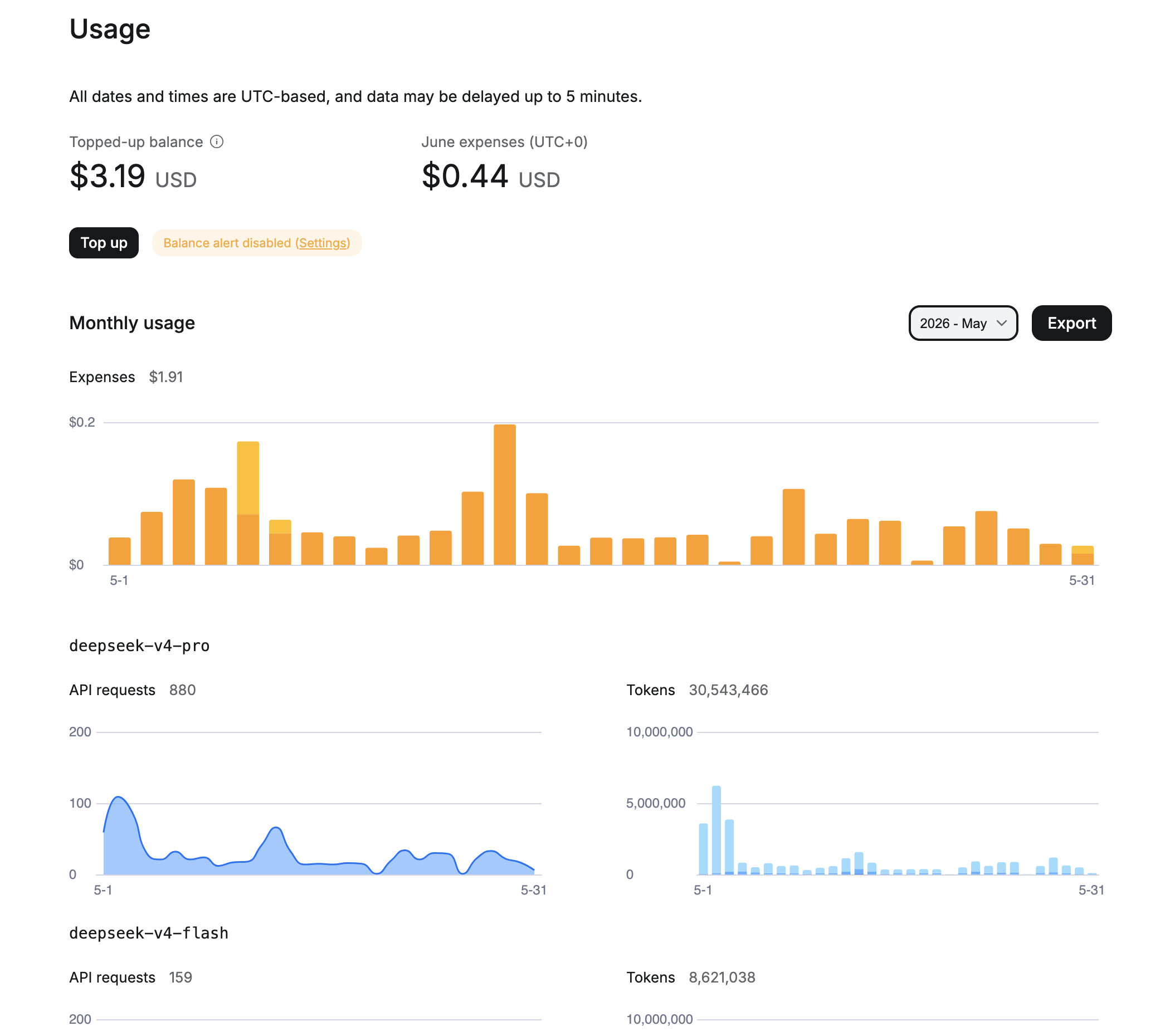
May 2026: I was still experimenting with models, so some requests went through deepseek-v4-pro. Total for the month: $1.91, 880 requests to pro and 159 to flash, over 30 million input tokens combined.
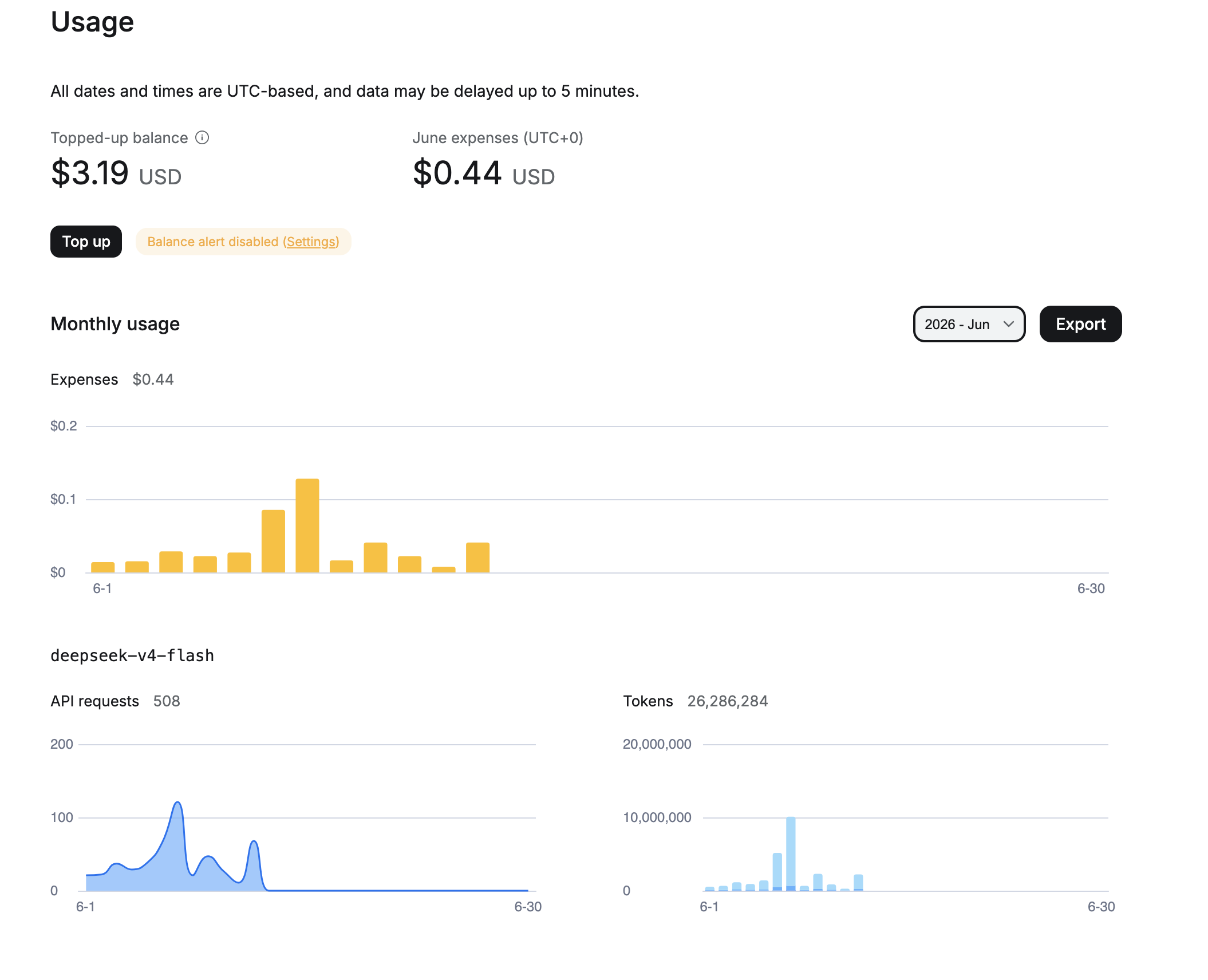
June 2026 (first 13 days): fully switched to deepseek-v4-flash. 508 requests, 26 million tokens, spent $0.44. At that pace, a full month comes out to around $1.
Cost structure by layer:
| Layer | Monthly volume | Real cost |
|---|---|---|
| GitHub private repo | — | $0 (GitHub Free) |
| STT (local faster-whisper) | ~30 voice notes | $0 for API, electricity only |
| DeepSeek via OpenRouter | ~500 requests, 26M+ tokens | ~$1/month on flash |
| OpenAI vision (rarely) | Screenshots and lab results | Separate variable line item; keep a cap |
| Electricity, laptop 24/7 | Around-the-clock operation | Depends on your rate and hardware draw |
May was more expensive because of the pro-model experiments. Flash handles routine normalization more cheaply and with no noticeable quality loss for journal entries. A stronger model makes sense only for rare monthly reflections — and only on the same assembled, verifiable context.
Privacy and data access: who sees what
Let me repeat the trust-boundary table from the first article, now with retention decisions:
| Layer | What it sees | My decision |
|---|---|---|
| Telegram | Every message to the bot | A conscious convenience tradeoff |
| DeepSeek | Text and derived text | Don’t send documents or identifiers |
| OpenAI vision | The images you send | A budget cap, no documents with names in frame |
| GitHub | The whole vault on push | Private repo + 2FA; remember: this is access control, not encryption |
| Local disk | Everything, including audio | Disk encryption, a shelf out of the cat’s reach |
There’s a separate trust boundary: the phone. In the second article we set up a one-way mirror of the vault to iCloud for reading on an iPhone, and it has a price: the journal’s contents also end up in Apple’s cloud. If that’s one participant too many for you, read the journal only on the desktop, or use a single sync mechanism whose trust model you understand. The Obsidian Git plugin’s mobile version technically exists, but it’s experimental and SSH-less; I wouldn’t rely on it.
Media storage decisions: I keep voice notes on a short-retention policy (30 days, then only the transcript remains), screenshot originals live permanently, and photos of documents are a separate conversation with separate caution. Whatever mode you pick, pick it before you start operating and write it down in _system/retention-policy.md: purging binaries from Git history after the fact is an evening’s work, and it rewrites history.
And a procedure for the worst case: if a secret or a file with personal data made it into the repo, simply deleting it doesn’t help (history remembers everything). The sequence: rotate the secret -> rewrite history -> force push -> check the clones. I worked through an incident like this on a work project in the article about accidentally pushed secrets, but ideally let it stay theoretical for you: the pre-commit secret scan from the second article exists for exactly this reason.
When it’s worth going fully local
Can you move the text layer off DeepSeek and onto your own laptop too? Technically yes: Hermes supports OpenAI-compatible providers; the Ollama path has to be configured through custom_providers and checked against your version. Then not even text leaves the machine. The honest requirements:
- there’s no universal minimum context: the requirements depend on the skills you choose, the volume of files, and the reflection scenario;
- hardware should be chosen via a benchmark matrix; my 2019 laptop handles local Whisper, but for a decent local LLM it’s already struggling;
- in my tests, small local models more often got the structure wrong, but that needs to be rerun on a single synthetic fixture with the results published, not generalized from an impression.
And the main thing: a local LLM doesn’t make the system “fully private.” Telegram still sees the messages, GitHub sees the vault. Going local makes sense deliberately, for a specific layer, not for the sake of a nice “self-hosted” word in a headline.
What breaks most often
This table reflects the operational problems that showed up over the first months of daily use, and it covers every layer of the system: the Telegram gateway, speech recognition, both model providers, Git, and the vault itself.
| Symptom | Cause | What to do |
|---|---|---|
| The bot is silent | The gateway daemon crashed or didn’t start after a reboot | hermes gateway status, logs, systemd |
| Reminder didn’t arrive / arrived late | Timezone or a stopped gateway | A test job at +2 minutes, timezone in the config |
| Voice notes take minutes to process | Whisper on CPU or an overloaded model | Shrink the model, check the GPU, measure latency |
| “I can’t see the image” | The vision provider isn’t configured or the model is out of date | Verify the model ID, key, limits |
| Text provider error | Out of balance or the model ID changed | DeepSeek balance, current ID |
| Push fails | SSH keys, token, network | ssh -T [email protected]; entries pile up locally, nothing is lost |
| Duplicate entries for one day | Broken upsert logic in the skill | Canonical path, the fixture from step 12 of the second article |
| The repo bloated | Audio and photos in Git | Retention policy, cleanup by rules, not “by eye” |
Over the first months this table covered most of my operational failures and helped me quickly figure out which layer to start the diagnosis from.
What remained after the first months
The journal works not because the model is smart, but because recording a day became easier than not recording it. The rest are consequences I understood not from architecture, but from specific episodes.
Once I dropped out of the habit for a week: a work trip, the routine broke, the bot was sending reminders to nobody. When I came back and saw seven empty days in the vault, my first impulse was to fill them in from memory. I didn’t. I left the gaps. Since then I’m much more relaxed about missed days: thirty imperfect entries are more useful than seven perfect ones, because only they’re real.
Most of my problems came not from the model but from a schema I’d broken once. I changed one frontmatter field without migrating old files, and the weekly summary started calculating statistics differently for old and new days. I only noticed three weeks later when the numbers started looking strange. After that I started trusting boring rules much more: canonical filenames, a strict schema, a correction dictionary — they gave me more than any model upgrade.
And this: I never touch raw entries anymore. All interpretations can be recalculated, a lost original cannot be recovered. That became clear the day I tried to ‘improve’ an old entry and lost the thread of what I’d actually thought that evening.
The journal did not make me healthier on its own. It made the consequences of decisions visible: the late show, melatonin, three bad nights before the gym. The decisions are still mine, and I still make some of them wrong — but at least consciously now.
The old laptop still sits on the shelf, the cat is still unhappy, and for the first time in my life a journal has survived its fourth month. For someone who quit every tracker by week three, that’s the best metric there is.
Over these months the agent did not turn into a doctor, therapist, or all-knowing Jarvis. In the end it turned out to be not a smart advisor. More like a system that doesn’t let me forget what I already told myself a month ago. It doesn’t live the day for me and doesn’t promise to understand me better than I understand myself. It helps me not lose facts and return to my own words in time, not a year later.
The series ends where the daily practice begins: at 9 PM my phone buzzes, I hold the record button, and for forty seconds I describe how the day went. The difference is that behind this simple action is no longer another closed service, but a history that belongs to me.
FAQ
Will this replace a doctor or a therapist?
No. The system collects observations and helps you prepare questions. Any health decisions go to a specialist, any worrying symptoms go straight to a doctor, not into the journal.
Won’t the model start “diagnosing” on its own?
It will, if you let it: models love to draw confident conclusions. That’s why the limits are baked into the skill and into the reflection prompt, not left to good faith. The “Forbidden” section of the prompt is its most important part.
What if I skip days?
Nothing. A skipped day is data, not a failure. The summaries show coverage (“sleep: 24/30 days”), and the system never invents values for missed days. Coming back after a break is nothing to be ashamed of: the bot doesn’t reproach you, it just keeps going.
Can I keep the journal in two languages?
Yes, Whisper handles mixed speech, and normalization brings everything to one schema. I dictate in Russian and plan to switch to English: daily dictation is great speaking practice, and the structure of the entries doesn’t depend on the language.
Why not hand it all to one strong assistant with memory?
Because the assistant’s memory isn’t your data. It’s the internal state of someone else’s service: you can’t export it in full, verify what’s in it, or move it to another provider. The Markdown files in my Git will outlive any provider, any subscription, and any policy change: even if both Hermes and DeepSeek vanished tomorrow, I’d still have a complete archive of entries that reads in anything. Plus I decide retention: what to keep, for how long, and when to delete it. With a service’s memory, the service makes all those decisions.
Where do I start if three articles is too much?
With a single habit: set a reminder for 9 PM and, for a week, answer it with a voice note even just in your “Saved Messages.” If the habit sticks, come back to the second article and build the full system: it’ll have something to process.