TL;DR
- Make the agent print one state line at the start of every response:
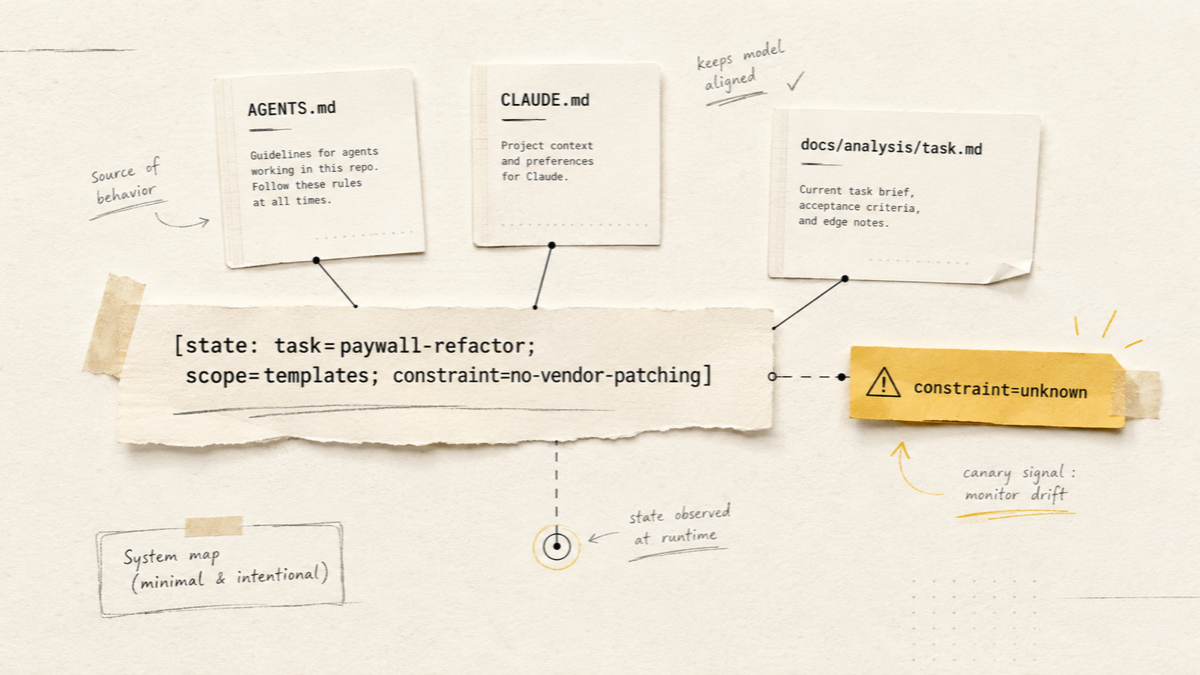
[state: task=…; scope=…; constraint=…]. While the line stays correct, you have a signal that the key instructions and task state are still being held. - When a field turns to
unknown,scopewidens on its own, ortaskgets swapped — that is a visible sign of context drift, which you catch before the agent writes wrong code. - A state-canary is an observability signal, not anti-hallucination magic. It catches lost instructions and task drift, but not confident factual lies. When it trips — reset the session and recover from markdown.
The most expensive mistake an AI agent makes is not the one it stumbles on and asks for help with. The expensive one is the mistake it makes confidently: it references a function that does not exist, “remembers” a constraint you never gave, rewrites something you agreed five turns ago not to touch. The tone of the answer does not change. Only the quality does — and you find out at review, after you have already spent an hour.
I have caught myself in the same loop several times: in a long session the agent starts inventing paths to files it read twenty turns earlier. The root cause is almost always the same — lost working context, not a “dumb model.” The problem is that the loss is invisible: there is no moment when the screen turns red and says “context degraded.”
This article is about a cheap observability trick that makes that loss visible: the state-canary — a status line the agent prints at the start of every response, directly per an instruction in AGENTS.md or CLAUDE.md. By the end you will have a copy-paste block you can drop into a project today, plus a protocol for when the canary trips.
If you have not built the agent’s base memory yet, start with AI agents in a developer’s workflow — it covers the AGENTS.md/CLAUDE.md pattern everything here builds on.
Who this helps — and when not to bother
The technique is not universal, and it is fairer to draw the boundary up front.
Especially useful if you
run long, multi-step tasks with AI coding agents; keep task state in markdown; work with Claude Code, Codex, or Cursor; and regularly catch confident mistakes after long sessions.
And the opposite — do not spend time on it when:
- you ask a short one-off question or solve a 5–10 minute task;
- the agent does not touch code at all (explanation, review, search);
- checking facts matters more than tracking context — there the safeguard is tests and sources, not a canary.
The problem: the agent is confident but no longer remembers the agreements
What is dangerous is not the mistake itself but its invisibility. The agent keeps an even tone whether it is working from current context or from its scraps. So you need an external indicator — something cheap and always in view that breaks before the result does.
The good news: the agent already picks up project instructions from AGENTS.md and similar files. You can use that same machinery as a sensor — ask it to constantly show what it is currently holding in its working state.
Why working context gets lost
Modern Claude and Codex models can work well when the needed context is physically in the window. But some of the confident mistakes in long sessions come not from a “dumb model” but from the working context being pushed out, blurred, or used less effectively. There are several mechanisms.
Window overflow. Every model has a limit on the tokens it holds at once. A session that runs hundreds of turns pushes out the early messages: opening instructions, agreed constraints, and decisions slide off the edge of the window.
Compaction and summarization. Claude Code compresses long history — via /compact or automatically when the window fills. Precision matters here, because the generalization “/compact loses CLAUDE.md” is wrong. The project-root CLAUDE.md is re-injected after compaction; but nested CLAUDE.md files in subdirectories do not come back on their own until the agent reads the file in that directory again. And most importantly — instructions that lived only in the conversation, plus details of the current task, can drop out of the effective working state even when the root memory has been re-read. That is why I keep the active task not in the chat but in a separate markdown file, and re-read it after a reset or compact.
Context rot. Even without hard truncation, accuracy falls as context grows — Anthropic’s context-window documentation explicitly describes recall degrading as volume increases. The decline is gradual: there is no point where “everything broke,” which is exactly why you cannot spot it by eye.
Lost in the middle. An instruction can physically be in the window yet sit in its middle. Models reproduce what is at the start and end of context more reliably than what is squeezed in the middle — the effect described in the “Lost in the Middle” study. An important rule surrounded by a large volume of text is followed worse.
Level 1. The simplest canary
Coal mines kept canaries: the bird reacted to dangerous air before people did. Same idea here — a cheap indicator that breaks first.
Put an instruction in AGENTS.md that is easy to verify at a glance, does not affect the task result, and is specific enough not to match by accident:
## Output format

Start every response with: "Alex,"
No exceptions, even for one-line answers.
While the prefix is there, the top instructions in the file are still being followed. Here is what a failure looks like in practice:
Turn 4:  Alex, updated the routes, here is the diff...
Turn 19: Done. Fixed the config, regenerated the cache...
         ^ the prefix is gone — time to check what else slipped
Important: keep this instruction short. Codex builds an instruction chain from several AGENTS.md files, and the project guidance has a size limit. The canary should be a single line, not a separate policy.
That is already enough to put you on alert. But a name prefix only records the fact of a failure, not its content.
Why the name is only the first level
A name gives a binary answer: the rule is followed or not. It will not tell you what exactly slipped — the task, the allowed boundary, or the project map. To make the canary diagnostic, you have to put state into it.
Level 2. State-canary: task / scope / constraint
Have the agent print one line reflecting the active context:
Before answering, print exactly one line:

[state: task=<task-slug>; scope=<allowed-area>; constraint=<main-constraint>]

If any field is unclear, write "unknown".
Do not invent missing state.
The three fields are not arbitrary: task answers “what are we on,” scope — “where code may be touched,” constraint — “what must not be done.” Here is how it reads on a real task:
[state: task=paywall-refactor; scope=WordPress/Timber templates only; constraint=no vendor patching]

Found a place where the paywall logic is still tied to a vendor override...
If on the next turn constraint becomes unknown or scope grows on its own, you will see it before the agent reaches into vendor code. The rule Do not invent missing state is key here: better it honestly writes unknown than paints a plausible field out of inertia.
A normal turn:
[state: task=paywall-refactor; scope=WordPress/Timber templates only; constraint=no vendor patching]

Checking only the Timber templates, not touching vendor.
A suspicious turn:
[state: task=paywall-refactor; scope=unknown; constraint=unknown]

I can edit the vendor file directly...
That is the moment to stop: the agent still speaks confidently, but the marker already shows that the working boundaries of the task are lost.
Why not a turn counter
It is tempting to add a turn counter to the marker — it looks tidy and “observable.” I do not use it: the model can keep counting mechanically, reset it, or fudge it, all while the context has already degraded. task, scope, and constraint are harder to fake out of inertia — so their diagnostic value beats a pretty number.
How to read the signal
The value of a state-canary is that different ways the marker breaks mean different things and call for different actions.
| Symptom | What it may mean | What to do |
|---|---|---|
| The whole marker is gone | The agent stopped following the top instruction | Do not continue blindly, check the state |
task changed without a command | The agent mixed up tasks | Restore the task-slug or start a new session |
constraint=unknown | The agent is unsure of the current constraint | Re-read the task md and scope |
| Marker is correct, but the facts are wrong | This is a factual hallucination, not context drift | Verify via tools, tests, sources |
| The agent started inventing paths | Lost the project map | Force a find/ls/read, do not trust memory |
What the canary catches, and what it does not
A state-canary is an engineering sensor, not a proof. The boundary is simple and worth keeping in mind:
- Catches context drift, instruction drift, and lost task state — cases where instructions have slid out of the effective context.
- Does not catch factual hallucination: if the agent confidently lies with a correct marker, the source is the model’s training prior, not lost context.
- Does not replace tests, tools, source verification, and code review. It is an early signal on top of them, not instead of them.
| Failure class | Does the canary help? |
|---|---|
| Window overflow, old instructions pushed out | Yes |
| Drift after compaction/summarization | Yes |
| Context rot (gradual recall degradation) | Partly |
| Lost in the middle (instruction present but ignored) | Partly |
| Factual hallucination with a correct marker | No |
| A requirement misread from the very start | No |
When you need a hook, not a canary
If a rule must not just appear in the response but be guaranteed to run at a specific moment — for example, running tests before a commit or forbidding writes to certain files — use hooks or automated checks. A canary shows that the agent remembers a constraint; a hook forces the environment to perform the action regardless of what the agent “remembers.”
Level 3. The recovery protocol
The marker is gone, changed on its own, or showed unknown. The main thing I do not do is try to fix a long session with yet another long prompt: that only adds tokens without removing the degradation. Instead — reset and recover from markdown:
If the state marker disappears, changes unexpectedly, or shows "unknown":
1. Stop the current task.
2. Summarize current state into docs/analysis/<task>.md.
3. Start a fresh session.
4. Re-read AGENTS.md/CLAUDE.md and the task markdown.
5. Continue from the last verified step.
That is why my active tasks live in docs/analysis/<task-slug>.md: the file serves as both the original analysis and a restore point. After /clear, the agent re-reads it and picks the thread back up in one turn — without replaying the whole conversation.
A ready block for AGENTS.md / CLAUDE.md
Copy into the root AGENTS.md or CLAUDE.md and substitute your own values:
## Agent state canary

At the start of every response, print exactly one line:

[state: task=<current-task>; scope=<allowed-area>; constraint=<main-constraint>]

Rules:
- Keep it to one line.
- Use "unknown" if unsure.
- Do not invent missing state.
- If the user changes task, update the task field.

If the marker disappears, changes unexpectedly, or shows "unknown":
1. Stop the current task.
2. Summarize state into docs/analysis/<task>.md.
3. Start a fresh session.
4. Re-read this file and the task markdown.
5. Continue from the last verified step.
FAQ
Will the marker break the agent’s answers?
No, if it is one line. The agent prints it first, then answers as usual. You either do not notice the line or you immediately see an anomaly.
Does this work outside Claude — with Codex or Cursor?
Yes, if the tool regularly picks up project instructions from AGENTS.md, CLAUDE.md, or an equivalent. It is not a system-level guarantee: Claude Code itself notes that CLAUDE.md is not a system prompt but an instruction the model tries to follow. That is exactly why a canary is needed as an observable signal, not as a hard safeguard.
What if the agent is “lazy” and skips the marker while context is fine?
It happens. So a single miss is a reason to be alert, not to reset the session. The signal is a marker gone for two or three turns in a row, or turned unknown.
Do you need a canary in short sessions?
No. Over 20–30 turns in a small project, degradation is unlikely. The value grows on long, multi-step tasks.
How do you tell lost context from an ordinary mistake?
By the pattern: the agent stopped following several rules at once, re-asks settled questions, confuses file paths. Three or four signals together are no longer a coincidence.
Sources and further reading
- agents.md — the open
AGENTS.mdstandard, a “README for agents.” - OpenAI Codex: AGENTS.md — Codex reads
AGENTS.mdbefore working and builds an instruction chain from it. - Claude Code: Memory — the behavior of
CLAUDE.mdand project memory. - Anthropic: Context windows — recall degradation as context grows (context rot).
- Lost in the Middle (Liu et al., 2023) — why the middle of a long context is reproduced worse.
- Google: Helpful, people-first content — why such material is worth writing from experience, not for search.
Related articles
- AI agents in a developer’s workflow — the base structure of agent memory via
AGENTS.mdandCLAUDE.md. - Claude Code subagents and token optimization — how isolating context in subagents lowers the risk of degrading the main session.