
TL;DR
- Treat an AI coding agent as a very fast junior developer: useful at speed, dangerous with production access. The real question is how to use it safely, not just how to use it.
- Five rules carry the workflow: least privilege, watch what it does, never delegate destructive operations, keep commits and pushes manual, and trust the work but never the consequences.
- The time savings come from the work around the code (issues, analysis, PR descriptions, regression checks), not from code generation. A clean
CLAUDE.md, scoped MCP tools and a five-stage workflow do most of it.
Most articles about AI agents either oversell them as magic or warn that they will replace developers tomorrow. After using Claude Code, Codex, Cursor and Google’s Gemini tooling on real projects, my view is more boring and, I think, more useful: an AI agent is a very fast junior developer who never gets tired, never reads the room, and must never be left alone with production access. Everything in this guide follows from that one idea.
This is the workflow I actually use day to day: the rules I follow, the tools I plug in, the prompts I reuse, and the parts I still do by hand. It is written for developers who are past the “wow, it wrote a function” stage and want a repeatable process that does not blow up in their face.
If you are already comfortable with the safety model and want the next layer, I wrote a separate practical guide to Claude Code subagents and token optimization. Read this article first if you are still deciding what an agent should be allowed to do. Read the subagents guide next when you are ready to split exploration, planning, review and browser testing into separate specialist agents.
I also published the copy-paste setup as Claude Code PHP Agents on GitHub: shared AGENTS.md, Claude-specific CLAUDE.md, reusable subagents, and templates for PHP, WordPress, Bedrock and Laravel projects.
Updated in May 2026: AI coding agents are no longer just smarter autocomplete. Codex now runs across CLI, IDE, cloud and mobile workflows, Claude Code has a mature permissions and hooks model, Cursor is pushing background agents and AI PR review, Google has Gemini CLI, Gemini Code Assist and Jules in the coding-agent conversation, and MCP has become the shared integration layer. That makes the opportunity bigger, but it also makes the safety model more important.
Why the safety question matters more than the productivity question
Before talking about productivity, one story. In 2025, The Guardian reported a case where an AI coding agent deleted a company’s production database while interpreting a task literally. That is not an exotic bug. It is the agent doing exactly what an agent does: read an instruction, execute it as directly as possible, with no real understanding of the surrounding business context.
I have my own smaller version of that story. Early on, I asked an agent to “clean up unused files in the project”. It happily deleted a folder I had not committed yet, including half a day of work. The agent did exactly what I asked. The mistake was mine, for asking that question with that scope, in that environment, with that level of confirmation. Once you internalise that the failure mode is structural, not occasional, the rest of the workflow stops feeling paranoid and starts feeling reasonable.
So the practical question today is not “how do I use AI agents”. It is “how do I use them safely”. Once you accept that framing, most of the workflow follows naturally.

Five rules I never break when working with agents
These rules have nothing to do with which model or tool you choose. They apply equally to Claude Code, Codex, Cursor, Gemini or anything that ships next month.
- Least privilege, always. The agent gets the minimum set of credentials and permissions to do the current task. Never an admin token “just in case”. For GitHub, a fine-grained token scoped to one repository with only the permissions the task needs. For databases, a read-only user unless writes are explicitly the goal. For cloud, a temporary credential that expires.
- Watch what it does, especially the first time. Treat the agent as a fast assistant whose output you review, not as a process you fire and forget. Modern agent CLIs ask for confirmation on shell commands by default. Keep that on. The day you turn it off is the day you lose something.
- Destructive operations are not delegated. Database migrations, deletions, force pushes, infrastructure changes, anything that touches money or auth. I run those myself. The agent can prepare the command and explain what it does. I press enter.
- Commits and pushes stay with the developer. The agent can draft the commit message and stage files. I review the diff line by line before
git commit, andgit pushis always manual. - Trust the work, not the consequences. A task is delegable. Its impact on production is not.
If you remember nothing else from this article, remember the last line.
Setting up a new project with an agent
Most agent tools today work the same way. You install a CLI (for example Claude Code or OpenAI Codex), point it at your repository, and let it index the project. From there, three configuration files do most of the heavy lifting.
What changed in AI agent workflows by May 2026
The tooling has moved from “chat with my repo” to a small operating model for software work. OpenAI’s own Codex safety write-up frames the pattern well: keep the agent inside technical boundaries, allow low-risk actions to move quickly, and make high-risk actions explicit. That is the same principle I apply locally.
Claude Code’s settings and hooks now make it realistic to encode project-specific guardrails instead of relying only on a sentence in the prompt. Cursor’s background agents are useful when the work can happen in a remote branch and be reviewed later, but they also raise the bar for repository permissions because the agent can run commands automatically in a remote environment. Google’s stack is split across Gemini CLI, Gemini Code Assist in the IDE, and Jules for asynchronous GitHub-connected coding tasks. MCP integrations are powerful for GitHub, browser testing, logs and documentation, but every MCP server is also a new capability surface. Treat it like you would treat a dependency with credentials.
My 2026 rule is simple: the more autonomous the agent becomes, the more explicit the boundary must be. Autonomy without scoped credentials, review gates and reproducible tests is not productivity. It is just speed applied to uncertainty.
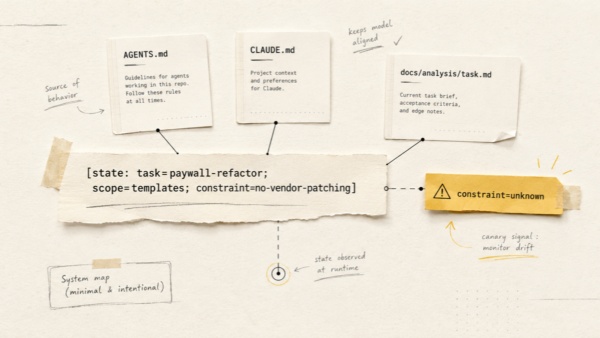
1. CLAUDE.md — the agent’s long-term memory
The single most important first step is initialisation. In Claude Code, running /init generates a CLAUDE.md file in the repo root. This file is loaded into every conversation. It is where you tell the agent how the project actually works.
Do not accept the generated file as is. The auto-generated version is a reasonable skeleton, but it almost always gets details wrong: invented commands, missed conventions, optimistic descriptions of how clean the codebase is. Read it line by line and correct it.
A good CLAUDE.md answers, in this order:
- What this project is, in one paragraph a stranger could understand.
- The stack and version constraints: PHP 8.3, Node 20, the specific framework version, anything weird.
- Commands: how to run, test, lint, deploy. Real commands that work today, not aspirational ones.
- Architecture: where things live, why, what the layering is. Two or three paragraphs, not a novel.
- Conventions: naming, file structure, the things you would correct in a PR.
- Off-limits: files and folders the agent should not touch, even when “fixing” something nearby.
- Deploy procedure: especially the manual parts.
Write it the way you would brief a new engineer joining the team. The agent uses it the same way.
1b. One AGENTS.md for all your agents
A small pattern that pays off the moment you use more than one tool. Instead of maintaining a separate CLAUDE.md, GEMINI.md and Codex config with the same content, keep a single AGENTS.md in the repo root as the source of truth, and make each tool-specific file just point at it:
# CLAUDE.md
@AGENTS.md
Same for GEMINI.md and any other agent that supports file references. You edit one file, every agent picks up the change. No more “I updated Claude’s instructions but forgot to update Gemini’s”, no more silent drift between tools.
2. Settings and permissions
Most agent CLIs let you configure which commands run without asking and which always require confirmation. Use that. I allow read-only commands (git status, git diff, ls, cat) silently and require confirmation for everything else. The five seconds it takes to press y are the cheapest insurance in your workflow.
3. Hooks for hard constraints
Anything that should be enforced rather than requested goes into hooks. For example, a pre-commit hook that blocks pushes to main, or a check that forbids editing certain files. The agent cannot “forget” a hook. It can absolutely forget an instruction.
4. Subagents for repeated specialist work
Once the basic project memory and permissions are in place, the next improvement is specialization. A single agent can do everything, but it should not do everything with the same model, the same tools and the same context. In Claude Code, project subagents live in .claude/agents/ and can be given narrow jobs: explorer, planner, reviewer, browser tester, documentation writer.
The safety benefit is just as important as the token benefit. An explorer can be read-only. A planner can be blocked from editing files. A reviewer can be told to inspect the diff without rewriting it. A browser tester can use Chrome DevTools MCP without touching source code. This gives you a cleaner workflow than one giant prompt that says “be careful” and hopes the model remembers.
My usual split is simple:
- Explorer: finds files, routes, tests and existing patterns before anyone writes code.
- Planner: turns the explorer’s evidence into an implementation plan for risky or multi-file changes.
- Reviewer: checks the changed files and expands only when a specific risk requires more context.
- Browser tester: runs local UI smoke checks, screenshots, console inspection and network inspection.
I keep the detailed copy-pasteable agent files in the companion article on Claude Code subagents, because that topic deserves its own treatment. The important point here is the operating principle: specialization should reduce authority, not expand it. A subagent is useful when it has a narrower job and a narrower permission surface than the main session.
The MCP tools I plug in
MCP (Model Context Protocol) is the standard that lets agents talk to external systems. Three integrations have become permanent fixtures in my setup, and a few I deliberately avoid.
GitHub MCP
The official GitHub MCP server lets the agent create issues, read PRs, post comments, run code review queries and search code across repositories. I use a fine-grained token scoped to a single repository with only the permissions the current task needs. Never a personal access token with org-wide admin. Never the same token across projects.
Laravel Boost
For Laravel backends, Laravel Boost exposes routes, logs, database queries and Artisan commands to the agent. It cuts a lot of “show me where this route is defined” back-and-forth. The killer feature is route inspection: the agent can answer “what controller handles this URL” without grepping.
Chrome DevTools MCP
Chrome DevTools MCP gives the agent a real browser. It can navigate, click, fill forms, inspect the network tab, read the console, take screenshots and run Lighthouse audits. This is what makes lightweight end-to-end testing possible without writing a Playwright suite first.
What I deliberately do not give the agent
Production database credentials. Anything with billing scope. SSH keys to live servers. My personal GitHub token. The pattern is simple: if a single bad command would create an incident, the agent does not get it.
My five-stage workflow
Once the agent is wired in, every non-trivial task goes through the same five stages. The point of the structure is not bureaucracy. It is to keep the agent useful in the parts where it is fast, and out of the parts where it is dangerous.
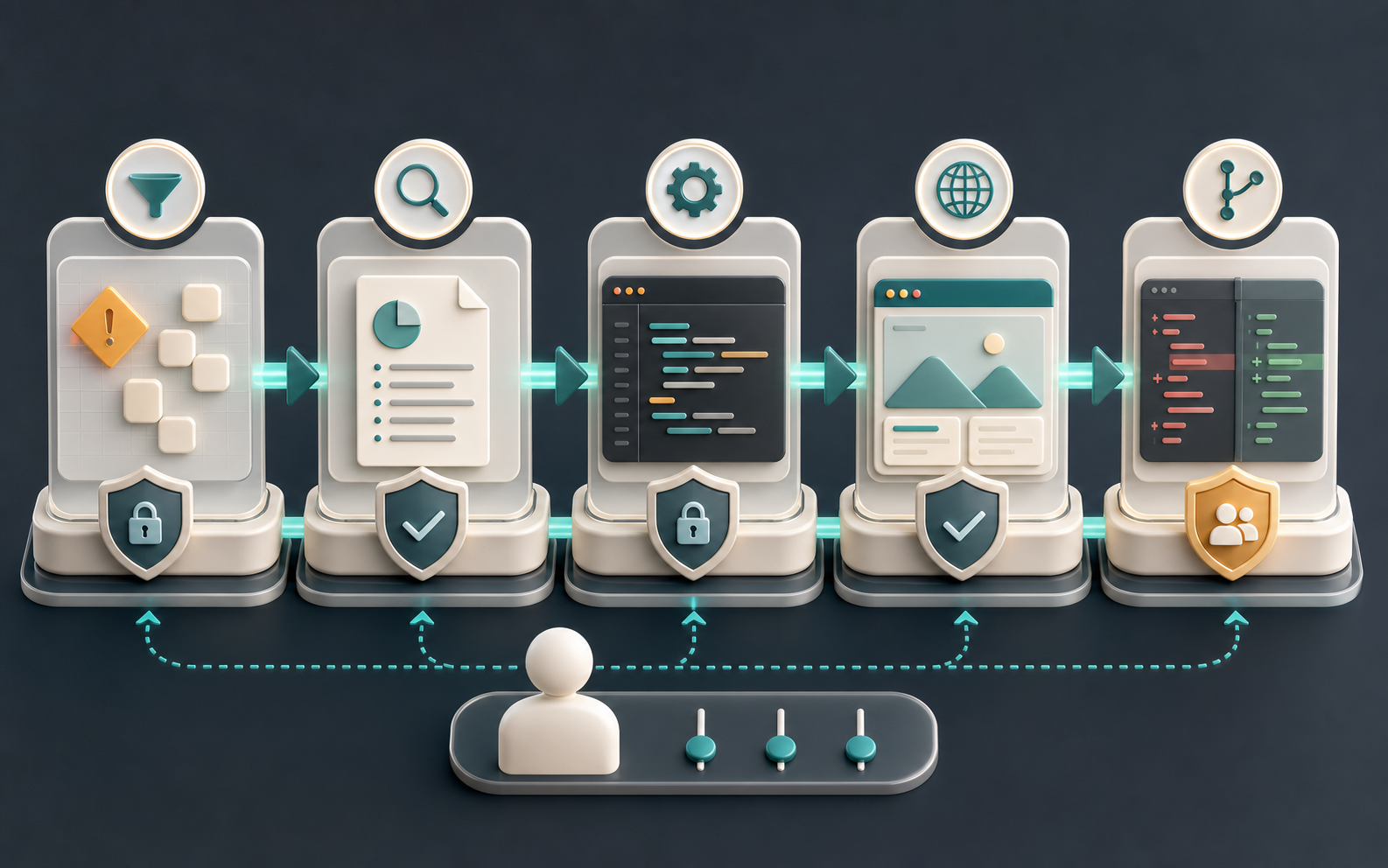
Stage 1. Create the issue
Filing a good GitHub issue used to take fifteen minutes. Now I describe the task in one paragraph and let the agent draft the issue, add labels, and link related ones. Example prompt:
“Create a GitHub issue: add backend support for the Usage Statistics block on the Subscription page for browser extension users. Mirror the existing SDK implementation. The response should expose
wordsLimit,wordsCount,wordsLeft,percentageUsed,percentageLeft. Reference the SDK controller. Suggest acceptance criteria.”
The result is a structured issue with context, acceptance criteria, file pointers and the right labels, in under a minute. I still read it before saving. The trick is to load the prompt with enough specifics that the agent does not invent details: name the existing implementation, name the fields, name the page.
Stage 2. Analyse the task in writing
Before any code, I ask the agent to study the existing implementation, find related files, surface constraints, and list two or three possible approaches with trade-offs. The critical step is asking it to save the result as a markdown file inside the repo, for example docs/analysis/usage-stats.md.
Why this matters more than it looks:
- The agent has limited working memory. A file gives it durable context it can reload later without re-reading half the codebase.
- You can re-read it tomorrow when the conversation context is gone.
- It forces the agent to commit to a position. Vague answers turn into specific ones once they have to be written down.
- If the agent’s analysis is wrong, you catch it now, when the cost of correction is a comment, not a rewrite.
A reusable prompt I use for this stage:
“Analyse this task before writing any code. Read the related files, identify the seams where the change has to land, list constraints (data shape, auth, caching, i18n), and propose two or three approaches with trade-offs. Save the analysis to
docs/analysis/<task-slug>.md. Do not edit any production code in this step.”
The “do not edit production code” line matters. Without it, agents have a strong tendency to start “fixing” things while they analyse.
A better 2026 analysis prompt
“Analyse this task as if you are preparing a small implementation RFC. Read the relevant files, list the exact files you inspected, identify the data contracts, permission boundaries, cache/i18n concerns, and the tests that already cover nearby behavior. Propose two approaches: the smallest safe change and the cleaner long-term change. Save the result to
docs/analysis/<task-slug>.md. Do not edit production code.”
The extra sentence about inspected files is not decoration. It makes hallucinated analysis easier to catch, because the agent has to show its evidence.
Stage 3. Plan, then implement
From the analysis, the agent produces a numbered plan: which file, which change, in which order. For a non-trivial task, this is where you catch wrong assumptions cheaply. Fixing a bullet point is free. Fixing a half-written feature is not.
Many agent CLIs have an explicit “plan mode” that suspends file edits until you approve. Use it. It is the difference between debating an approach in 30 seconds and reverting a confidently wrong diff after the fact.
Depending on risk, I either implement the plan myself using the agent for autocomplete-style help, or let the agent execute step by step while I review each diff. A rough rule:
- Pure refactors, scaffolding, tests, boilerplate: let the agent drive, batch-review the diff.
- New business logic: agent writes, I review every change line by line.
- Security, auth, payments, migrations: I write, agent reviews.
Stage 4. Test in a real browser
With Chrome DevTools MCP, the agent can:
- Open the local environment
- Register a test user or log in with a fixture account
- Walk through the affected user flow
- Watch the console and network tab for errors
- Take screenshots at the failure point
This catches obvious regressions and saves the most boring part of manual QA. A useful pattern is to give the agent a checklist: “open the subscription page, confirm the new block renders, confirm wordsLeft matches the API response, confirm there are no 4xx or 5xx in the network tab, take a screenshot, report”.
What this does not catch: UX problems, accessibility issues, slow paint, or “this works but feels wrong” interactions. I always go through the feature myself after the agent reports green. Browser automation is a regression net, not a quality bar.
Stage 5. PR and commits
Commits are mine. The agent can draft the message, but I stage the files, review the diff, and run the commit. Same with git push.
The PR description, on the other hand, is a great delegation target. The agent reads the diff, summarises the change, lists files touched, and proposes a test plan and rollout notes. I edit and submit. A prompt that consistently produces a useful PR description:
“Write a PR description for the current branch. Include: a one-paragraph summary, a bulleted list of user-visible changes, a bulleted test plan, any migration or rollout notes, and the issue link. Read the diff against
main, do not invent changes that are not in the diff.”
The “do not invent” clause is doing real work. Without it, agents will pad PR descriptions with plausible-sounding changes that are not actually in the code.
Where the real time savings come from
If you measure the impact honestly, the agent almost never saves time by “writing the code”. The code part is usually a small share of the work. The savings come from everywhere else:
- Issue creation: from 15 minutes to about 1 minute.
- Codebase analysis on unfamiliar code: from hours of reading to 5 to 10 minutes of structured output.
- PR descriptions: from 10 to 15 minutes to about 1.
- Basic regression testing: a chunk of repetitive clicking, gone.
- Boilerplate (CRUD endpoints, form scaffolds, test fixtures, repetitive migrations): minutes instead of tens of minutes.
- Reading docs to find one thing: the agent reads, you ask. This one quietly saves more time than anything else.
This is the real value: the agent removes the supporting work that surrounds the actual engineering, so you spend more of your day on the decisions only a human should make. The hour-per-day saving is real. The “the agent built it for me” promise is mostly marketing.
The checklist I use before letting an agent touch a task
- Can I describe the expected outcome in one paragraph? If not, I clarify the task myself first.
- Is the blast radius small? A CSS fix, a test fixture or a local script is agent-friendly. Payments, auth and migrations are not.
- Does the agent have only the access it needs? Read-only by default, write access only where the task requires it.
- Is there a way to verify the result? A test, a browser path, a WP-CLI command, a screenshot, a diff review.
- Can I throw the attempt away? If the answer is no, I use a branch, a worktree, or I do the work manually.
This checklist is boring on purpose. Boring process is what lets you use exciting tools without making your production environment part of the experiment.
Non-obvious lessons I had to learn the hard way
Context rot is real
The longer a conversation runs, the worse the agent gets. After a long session of edits, tangents, and aborted attempts, the model starts contradicting earlier decisions, forgetting constraints from the system prompt, and re-introducing bugs it already fixed. When you feel that happening, the right move is not to push harder. It is to start a fresh conversation, point at the analysis file from Stage 2, and continue from there. This is one of the highest-leverage habits in agent work.
Agents over-edit when given vague tasks
Ask for “a fix” and you will get a fix, plus a rename, plus a “small cleanup”, plus a refactor of a function the agent decided was ugly. Always state the boundary explicitly: “change only the function X. Do not refactor anything else. Do not rename. Do not move files.” This sounds neurotic until you have spent an hour reverting unrelated changes.
Write tests with the agent, but not for the agent
Letting the agent write the test for the feature it just wrote is a common trap. The test ends up encoding the agent’s misunderstanding rather than the requirement. Either write the test first yourself and have the agent make it pass, or write the test in a separate conversation from the implementation. The second model is harder to convince than the same model.
Use git worktrees for parallel agent work
When you want the agent to attempt something risky without blocking your main branch, run it in a separate git worktree. You get an isolated working directory on a separate branch, and you can throw the whole thing away if the attempt goes sideways. It is much safer than stashing and switching branches under an agent that may not understand the change of context.
Token cost is mostly noise, attention cost is the real budget
People worry about token spending, and for individual tasks that worry is often overblown. A developer hour is still more expensive than a typical agent session. But token cost becomes real when a whole team uses agents every day, especially if expensive models are doing mechanical work: searching files, reading logs, summarising diffs, clicking through browser flows.
The practical answer is not obsession over every token. It is routing. Keep your attention budget for reviews and decisions, and route low-judgement tasks to cheaper, narrower subagents. That is why the subagent pattern matters: it reduces token waste without asking the developer to review less carefully.
Two-agent review beats one-agent self-review, but not by as much as you think
A pattern that is becoming popular is using two different agents in tandem. One generates a solution, the other reviews it. Claude writes, ChatGPT reviews, or the other way around. It works surprisingly well: a second model sees blind spots the first one missed and often pushes back on shaky assumptions. It is not a silver bullet though. Two agents can confidently agree on the same wrong answer, especially on questions involving project-specific context they do not have. The final call still belongs to a human.
The confidence trap
Agents almost never sound unsure. They will explain an approach that does not work with the same calm authority as one that does. Calibrate accordingly. The right question is rarely “is this right” (the answer will be yes). The right question is “what would have to be true for this to be wrong, and how do I check those things”.
Common mistakes I see beginners make
- Giving the agent admin-level credentials. Always scope down. A read-only token solves 80% of cases.
- Skipping the
CLAUDE.mdreview. Garbage in, garbage out, for every task forever. - Accepting code without reading the diff. The agent will happily delete tests to make them pass, or comment out failing assertions.
- Letting the agent run
git pushor production commands. The risk is not worth the saved keystroke. - Asking for “a fix” with no analysis stage. You will get plausible code that addresses a symptom, not the cause.
- Letting one conversation drag on for hours. Start fresh. The cost of re-priming context is far less than the cost of acting on degraded context.
- Trusting agent self-reports. “All tests pass” deserves a verification step. So does “this is fully implemented”.
A concrete example from my own workflow
Take a recent task on this very site: normalising Polylang page slugs so that /about/, /ru/about/, /uk/about/ and /es/about/ all resolve the same way. The five stages played out like this:
- Issue: one paragraph describing the inconsistency, agent drafted the issue with file pointers in about a minute.
- Analysis: agent traced the slug logic across Polylang, the rewrite rules and the theme, dropped the result into
docs/analysis/polylang-slugs.mdwith three candidate approaches. - Plan: we picked the lowest-risk option (a normalisation script run once at deploy time) and the agent broke it into a small set of file changes plus the script itself.
- Implementation: agent wrote the script, I reviewed each diff. Two issues caught at review: an over-eager rename and a missing language guard. Both fixed before commit.
- Test and deploy: Chrome DevTools MCP verified all four language URLs returned 200 after running the script locally. I deployed manually with a one-liner
git pull && wp eval-file && wp rewrite flush.
End-to-end time: under an hour for a change that would previously have taken an afternoon. The agent did not invent the solution. It removed the search-and-read overhead around it.
FAQ
Do I need a paid plan to get value out of agents?
For serious daily use, yes. Free tiers are fine for trying the workflow, but real productivity comes from longer context windows and faster models, which usually live behind paid plans. The cost is small compared to a developer hour.
Will an AI agent replace developers?
Not in the form they exist today. They replace specific tasks, not the role. The bottleneck of software is still judgement, design and responsibility, and none of those are delegable yet. Agents make individual developers faster. That tends to raise the bar for the role, not lower it.
Is it safe to let the agent run shell commands?
Yes, with two conditions: a restricted environment (containerised or scoped) and explicit confirmation for anything destructive. Most modern agent CLIs support both. Never disable confirmation prompts on a machine that can reach production.
Claude Code, Codex or Cursor — which one?
Claude Code, Codex, Cursor and Gemini are all worth watching, but they are not interchangeable. Cursor is strongest when you want the agent inside the IDE, with background agents and PR review close to the editor. Claude Code is excellent when you want terminal-native work with strong project memory, settings and hooks. Codex is especially interesting when you want the same agentic workflow across CLI, cloud, IDE and mobile handoff. Gemini CLI and Gemini Code Assist matter if your team is already in the Google ecosystem, while Jules is closer to an async coding agent that works from GitHub tasks. The right answer is still to try each one on a real task, not on a demo.
What is the single highest-leverage habit?
Writing a clean CLAUDE.md (or equivalent) and keeping it up to date. Every other improvement compounds on top of that.
When should I start using subagents?
Start when you see the same specialist task repeating: codebase exploration before every change, architecture planning for risky work, diff review before commits, or browser smoke testing after UI changes. Do not start with ten subagents. Start with explorer, planner and reviewer, then add browser testing if you have the tooling.
Key takeaways
- An AI agent is a fast assistant, not an autonomous engineer. Treat it that way and the rest of the workflow becomes obvious.
- Safety, scoped credentials and human-controlled destructive actions are non-negotiable.
- The biggest productivity gain is not code generation, it is the elimination of supporting work around the code.
- A clean
CLAUDE.md, a thoughtful MCP setup and a five-stage workflow get you most of the way there. - Manage context like a real budget: start fresh sessions often, save analysis to files, scope every prompt narrowly, and use subagents when repeated specialist work deserves its own context.
- Final responsibility for architecture, decisions and consequences stays with the developer.
Related articles
- When a Leaked Secret in Git Turned Into a Four-Year History Rewrite — a real incident that explains rule #1 better than any guide.
- Claude Code Subagents: Copy-Paste Agents for Safer, Cheaper Workflows — the specialist-agent setup I use after the safety workflow is in place.
- Debugging a Production Site After AI Deployment — what to do when something the agent shipped breaks in production.
- How I Built and Deployed a Custom WordPress Theme with AI Agents in Under 6 Hours — the same workflow applied end to end on a real project.