TL;DR
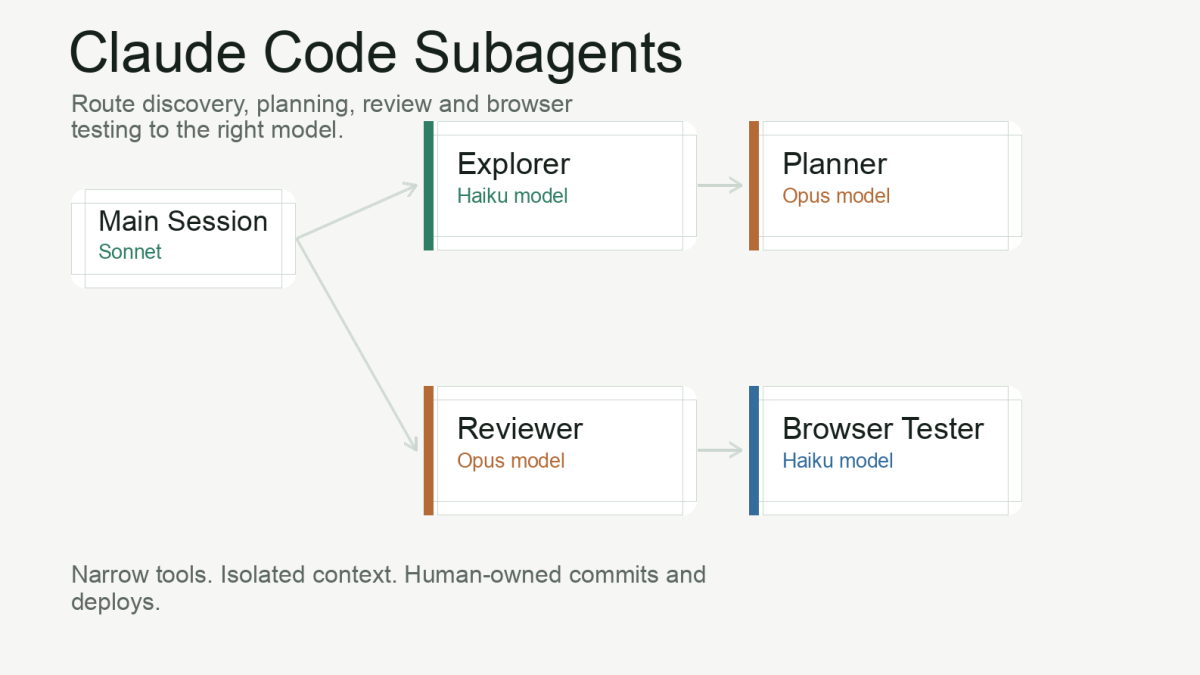
- Subagents let you route work by model: Haiku for discovery and mechanical checks, Sonnet for implementation, Opus for planning and high-risk review.
- Token savings come from context isolation and removing repeated waste, not one clever prompt: the main session gets a compact summary instead of every intermediate token.
- Start with three agents (explorer, planner, reviewer), keep them read-only where possible, put them in
.claude/agents/, and define a delegation policy inCLAUDE.md.
Claude Code gets expensive when every task is treated as if it deserves the strongest model and the full conversation history. Reading files, searching for symbols, summarising logs, checking a browser console, drafting a commit message and planning a risky refactor should not all run through the same reasoning path.
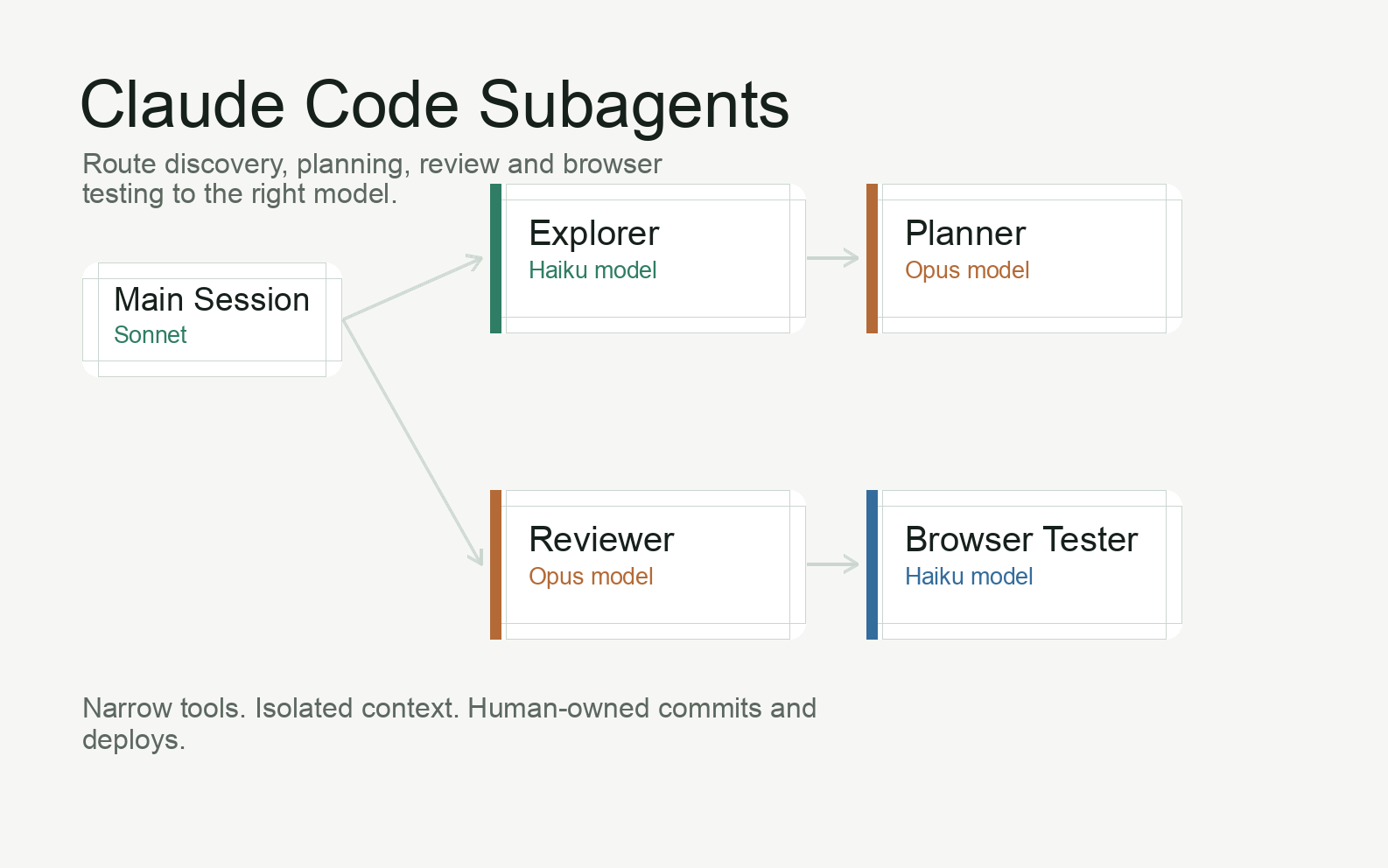
The fix is not to make the model “think less”. The fix is to route work deliberately. Claude Code subagents let you give different jobs to different assistants: a cheap explorer for discovery, a stronger planner for architecture, a reviewer for high-risk diffs, and a mechanical browser tester for UI checks. Each one has its own prompt, model and tool permissions.
This guide is the practical companion to my broader article on AI agents in the development workflow. That article covers safety, permissions, MCP, browser verification and the human review loop. This one narrows in on Claude Code subagents: how I structure them, what files to create, where token savings actually come from, and which mistakes make multi-agent setups worse instead of better.
The examples below are designed to be copied into .claude/agents/ and adapted. They are intentionally conservative: read-only where possible, diff-first where possible, and explicit about when the agent should stop.
GitHub template: I published the full setup as a public repository: Claude Code PHP Agents. It includes AGENTS.md, CLAUDE.md, the subagents from this article, and templates for WordPress Bedrock, classic WordPress, Laravel and generic PHP projects.
Quick Answer: What Are Claude Code Subagents?
A Claude Code subagent is a specialized assistant defined as a Markdown file, usually inside .claude/agents/ for project-level agents or ~/.claude/agents/ for user-level agents. The file contains YAML frontmatter for metadata such as name, description, model and tools, followed by the subagent’s system prompt.
According to the Claude Code subagents documentation, subagents are useful for task-specific workflows and context management. In practical terms, they let the main session delegate bounded work without dragging every token from that work back into the main context.
.claude/
  agents/
    explorer.md
    planner.md
    reviewer.md
    browser-tester.md
That folder is the difference between “Claude, please figure everything out” and an actual operating model for agentic development.
Why Subagents Reduce Token Waste
Most token waste in coding-agent sessions comes from using deep reasoning for shallow work. A model does not need Opus-level reasoning to find the controller that handles a route. It needs fast search, file reads and a concise report. The expensive reasoning should happen after discovery, when the relevant files and constraints are already known.
Subagents help in three ways:
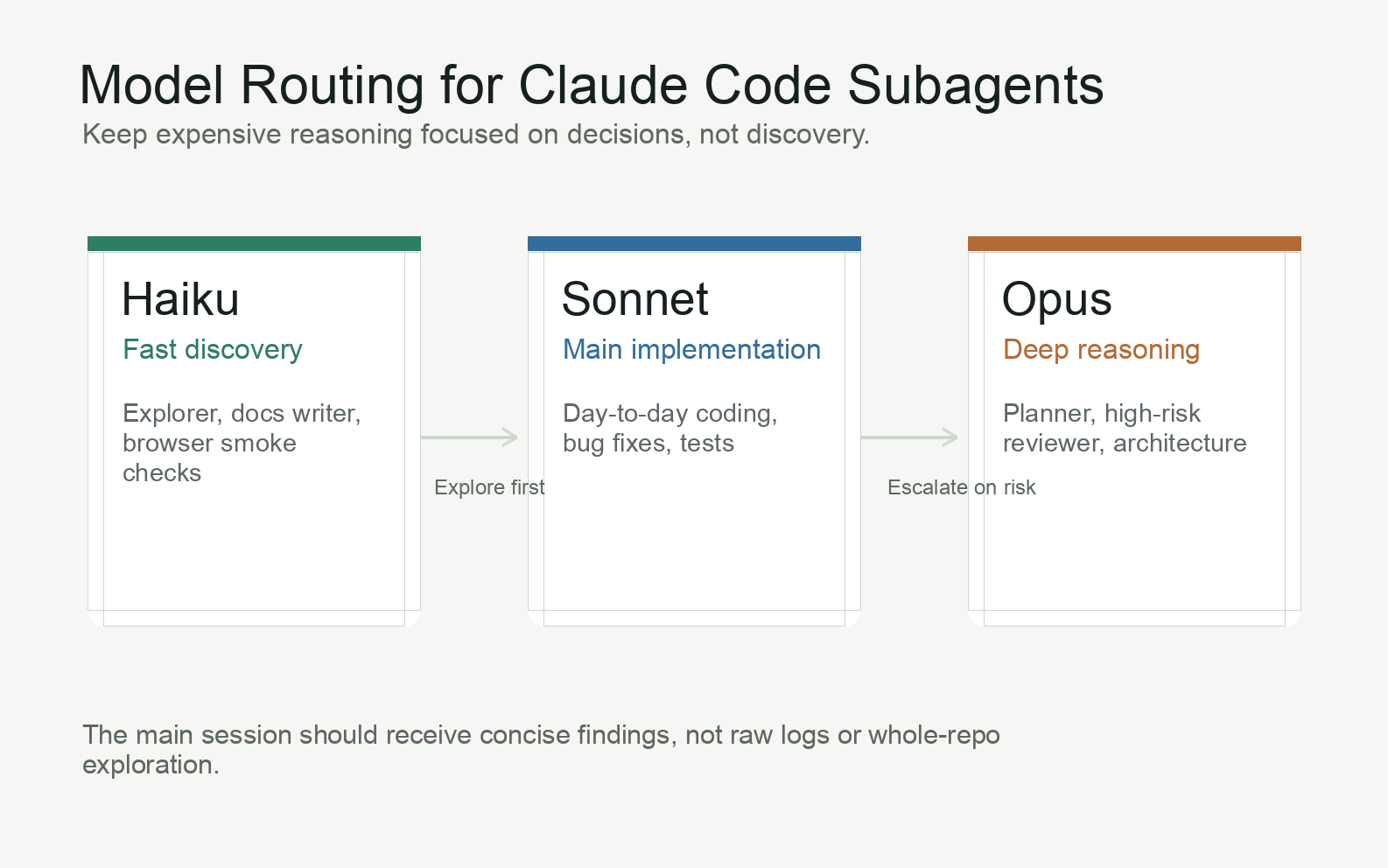
- Model routing: simple tasks can run on Haiku, normal implementation can stay on Sonnet, and Opus can be reserved for planning, architecture and difficult review.
- Context isolation: a discovery agent can read many files, but the main session only receives the final summary instead of every intermediate token.
- Permission scoping: a read-only explorer or planner can be blocked from editing files regardless of what the task prompt says.
I do not recommend publishing a claim like “this saves exactly 70 percent” unless you measure your own usage. In my projects, the savings were obvious because the expensive model stopped doing file discovery, log reading and mechanical browser checks. Your exact number will depend on how often you delegate, how large your repository is and which model you normally use as the main session.
The Model Routing Pattern I Use
| Model tier | Use it for | Avoid using it for |
|---|---|---|
| Haiku | Codebase discovery, file search, log summaries, docs summaries, changelogs, commit messages, browser smoke checks | Architecture decisions, ambiguous bugs, security-sensitive logic |
| Sonnet | Most implementation, standard bug fixes, test writing, moderate refactors, normal code review | Tasks that are either purely mechanical or genuinely architectural |
| Opus | Architecture planning, unfamiliar legacy code, high-risk diffs, auth, billing, migrations, cross-cutting refactors | Routine file reading, raw log analysis, formatting, PR summaries |
My default is simple: the main conversation runs on Sonnet, discovery and mechanical verification run through Haiku subagents, and Opus appears only when the task needs deeper judgement. That keeps the main agent fast while still giving difficult decisions the model quality they deserve.
Copy-Paste Subagents for .claude/agents/
These are intentionally small. A subagent should have one job, a clear boundary and an obvious reason to exist. If the prompt becomes a page of instructions, you are probably mixing roles.
.claude/agents/explorer.md
Use this before planning or editing unfamiliar code. Its job is to find the relevant surface area and return evidence, not opinions.
---
name: explorer
description: Use proactively when a task needs codebase discovery before planning or editing. Finds relevant files, symbols, routes, tests, and existing patterns. Returns path:line references only.
model: haiku
tools:
  - Read
  - Grep
  - Glob
  - Bash
---

You are a read-only codebase explorer.

Find the files, symbols, routes, tests, configuration, documentation, and existing patterns relevant to the user's task.

Rules:
- Do not modify files.
- Do not propose an implementation plan unless asked.
- Prefer precise path:line references over broad summaries.
- If you use Bash, use read-only commands only.
- If the evidence is weak, say what you could not find.

Return:
1. Relevant files and why they matter.
2. Existing patterns or helpers to reuse.
3. Tests or verification paths nearby.
4. Open questions or missing context.
.claude/agents/planner.md
Use this after the explorer, not before. The planner should spend its reasoning budget on trade-offs and sequencing, not on finding files.
---
name: planner
description: Use after explorer for architecture decisions, multi-file changes, auth, billing, migrations, routing, caching, i18n, or risky refactors. Produces a plan; does not edit code.
model: opus
tools:
  - Read
  - Grep
  - Glob
---

You are a senior implementation planner.

Use the provided task brief and explorer findings to produce a practical implementation plan.

Rules:
- Do not edit files.
- Do not run shell commands.
- Do not restate the whole codebase.
- Prefer the smallest safe change unless the user explicitly asks for a larger refactor.
- Call out risks, unknowns, and rollback considerations.

Return:
1. Recommended approach.
2. Files to change, with the reason for each file.
3. Step-by-step implementation order.
4. Tests and manual verification.
5. Risks and decisions needed from the developer.
.claude/agents/reviewer.md
The reviewer should be diff-first. If it starts reading the entire repository for every review, it becomes slow, expensive and noisy.
---
name: reviewer
description: Use after implementation for high-risk changes or before committing. Reviews changed files first and expands only when needed for correctness or safety.
model: opus
tools:
  - Read
  - Grep
  - Glob
  - Bash
---

You are a strict code reviewer.

Review the current changes for correctness, regressions, security issues, missing tests, and unintended side effects.

Rules:
- Start from the diff and changed files.
- Read unchanged files only when needed to verify a specific risk.
- Do not rewrite code.
- Do not approve vague behavior without a verification path.
- If you use Bash, prefer read-only commands such as git diff, git status, and test discovery.

Return findings first, ordered by severity:
- Critical: must fix before commit.
- Major: should fix before commit.
- Minor: optional improvement.
- Test gaps: what was not verified.

If there are no findings, say that clearly and list residual risk.
.claude/agents/browser-tester.md
This one is useful only if your Claude Code setup has browser tooling through MCP or another integration. Keep it mechanical: navigate, observe, screenshot, report.
---
name: browser-tester
description: Use for local UI smoke tests, regression checks, console/network inspection, and screenshot capture. Requires the local dev server to be running.
model: haiku
tools:
  - mcp__chrome_devtools__navigate_page
  - mcp__chrome_devtools__take_snapshot
  - mcp__chrome_devtools__take_screenshot
  - mcp__chrome_devtools__list_console_messages
  - mcp__chrome_devtools__list_network_requests
  - mcp__chrome_devtools__click
  - mcp__chrome_devtools__fill
  - mcp__chrome_devtools__press_key
---

You are a browser regression tester.

Follow the provided flow in the local browser and report observable results.

Rules:
- Do not modify source files.
- Do not invent expected behavior.
- Capture screenshots for visual regressions or unclear states.
- Check console errors and failed network requests.
- Report the exact URL, viewport if relevant, and steps performed.

Return:
1. Flow tested.
2. What passed.
3. What failed or looked suspicious.
4. Console/network errors.
5. Screenshot paths or notes.
.claude/agents/docs-writer.md
Documentation is a good Haiku task when the source material is clear. The agent should summarize existing truth, not invent project policy.
---
name: docs-writer
description: Use for README updates, changelog entries, release notes, setup notes, and internal documentation based on existing code or diffs.
model: haiku
tools:
  - Read
  - Grep
  - Glob
---

You write concise developer documentation from existing source material.

Rules:
- Do not invent commands, features, environment variables, or guarantees.
- If a command is not present in the repository, mark it as an assumption.
- Keep documentation practical and skimmable.
- Preserve the repository's existing tone and formatting.

Return the proposed documentation text and list the files it is based on.
Add a Delegation Policy to CLAUDE.md
Subagents work better when the main session has a written policy for when to call them. Without that policy, delegation becomes inconsistent: one session uses the explorer, another burns Opus tokens reading the same files manually.
## Subagent Delegation Policy

- Use `explorer` before planning or editing unfamiliar code.
- Use `planner` only after `explorer` for risky or multi-file changes.
- Use `reviewer` after implementation when the change touches auth, billing, migrations, routing, caching, permissions, security, or shared abstractions.
- Use `browser-tester` for local UI verification when the task affects browser behavior.
- Use `docs-writer` for documentation based on existing code, diffs, or verified commands.

Anti-loop rules:
- Do not call the same subagent twice for the same unresolved question.
- If a subagent returns weak findings, refine the task brief instead of repeating the same call.
- Reuse existing planner or reviewer output unless the code materially changed.
- Stop delegating when two subagent calls produce overlapping information.

Permission rules:
- Read-only agents must not edit files.
- Destructive commands, production commands, force pushes, and credential changes require human approval.
- The developer owns commits, pushes, deploys, and production execution.
This connects directly to the safety model from my AI agent workflow guide: subagents can make the workflow cheaper and cleaner, but they do not remove the need for scoped permissions, human checkpoints and manual control over destructive operations.
A Practical Workflow: Explorer to Planner to Implementation to Review
For a normal feature or bug fix, my Claude Code workflow looks like this:
- Brief the main session: describe the desired outcome, constraints and verification path.
- Delegate discovery to
explorer: get file paths, existing patterns and tests. - Use
planneronly if needed: high-risk or multi-file changes get an implementation plan; small changes can skip this step. - Implement in the main session: usually Sonnet, with narrow instructions and frequent diff review.
- Run tests and local checks: unit tests, linting, WP-CLI, browser flow, or whatever the project requires.
- Ask
reviewerto inspect the diff: especially for auth, billing, caching, database and routing changes. - Commit manually: the agent can draft the message; the developer reviews and commits.
The key is that the expensive reasoning agent sees a curated version of the problem. It does not spend its budget discovering that routes/web.php exists or that a test file lives under tests/Feature/.
Where Token Savings Actually Come From
The biggest savings are not from one clever prompt. They come from removing repeated waste:
- Discovery happens once: the explorer finds relevant files and returns compact pointers.
- Plans start with evidence: the planner reasons over a small set of known files instead of the whole repository.
- Reviews stay on the diff: the reviewer expands context only when a specific risk demands it.
- Mechanical work uses cheap models: screenshots, console checks, release notes and summaries do not need top-tier reasoning.
- The main context stays cleaner: fewer irrelevant file reads means fewer irrelevant tokens carried into the next turn.
There is also a quality benefit. A small, role-specific prompt is easier to audit than a single giant “do everything” prompt. When a subagent behaves badly, you can fix one file instead of rewriting your whole workflow.
Common Mistakes With Claude Code Subagents
Giving every subagent write access
Do not give Edit, Write or broad shell permissions to agents that do not need them. A planner that can edit code is no longer a planner. A reviewer that rewrites code is no longer an independent reviewer.
Creating too many agents too early
Start with explorer, planner and reviewer. Add browser-tester if you use browser MCP. Add docs-writer if documentation is a repeated task. Do not create twenty personas because the feature exists. Each subagent should map to a real recurring workflow.
Using Opus for broad exploration
Opus is valuable when the problem is hard, not when the repository is large. Let Haiku find the relevant files first. Then use Opus for judgement.
Passing raw logs and giant outputs to the planner
Summarize first. A log summarizer can extract the error pattern, affected request and stack trace. The planner does not need 5,000 lines of repeated warnings.
Letting delegation loop
If the same agent is called twice with the same question, something is wrong with the brief. Stop, restate the problem, add missing context or make a human decision.
Should You Publish Your Subagent Setup?
Yes, if you frame it correctly. I did exactly that with claude-code-php-agents: a small public repository with AGENTS.md, CLAUDE.md, reusable .claude/agents/ files, and PHP/WordPress/Laravel templates. That is more useful than hiding the setup inside a long article because readers can clone it, copy the parts they need, and adapt the rules to their own project.
The caveat is that subagents are project-shaped. My setup for a WordPress Bedrock site with Polylang, LiteSpeed cache and manual deployment is not a perfect fit for a TypeScript monorepo or a Laravel API. The reusable part is the pattern: cheap discovery, expensive planning, diff-first review, mechanical browser checks and written anti-loop rules.
If you publish the setup, make the repository honest:
- Explain which project type it was designed for.
- Mark MCP tool names as examples that may need renaming.
- Include a minimal
CLAUDE.mddelegation policy. - Tell users to start with three agents, not the whole catalog.
- Link back to the workflow article for the safety model.
What Subagents Do Not Solve
Subagents do not make unsafe work safe. A cheap model with production credentials can still cause expensive damage. A reviewer with write access can still hide the bug it was supposed to catch. A planner can still make a bad architectural call if the task brief is vague.
They also do not replace developer judgement. The human still owns the requirement, the trade-off, the diff, the commit and the deployment. Subagents are a routing layer for attention and context. They make a disciplined workflow faster. They do not turn an undisciplined workflow into a reliable one.
FAQ
Where do Claude Code subagent files go?
Project-specific subagents usually go in .claude/agents/. User-level subagents go in ~/.claude/agents/. Project agents are better for team workflows because they can be committed with the repository.
Which Claude model should I use for subagents?
Use Haiku for discovery and mechanical tasks, Sonnet for normal implementation, and Opus for planning or review where deeper reasoning is worth the cost. Treat this as a starting point, not a law.
Can a subagent edit files?
Yes, if you give it editing tools. For safety and cost control, I keep explorer, planner and reviewer read-only. Implementation usually stays in the main session where I can review changes directly.
How many subagents should a project have?
Most projects should start with three: explorer, planner and reviewer. Add more only when you see a repeated task with a clear boundary, such as browser testing or documentation.
Do subagents remove the need for CLAUDE.md?
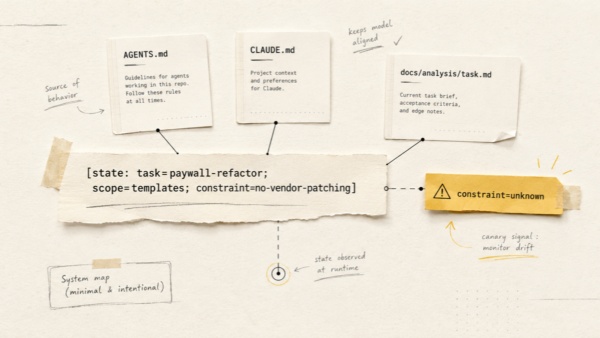
No. CLAUDE.md is where you define project rules and delegation policy. Subagents are the workers; CLAUDE.md is the operating manual that tells the main session when and how to use them.
Key Takeaways
- Claude Code subagents are most useful when each one has a narrow role, a model choice and a tool boundary.
- Use Haiku for exploration and mechanical checks, Sonnet for day-to-day implementation, and Opus for planning or high-risk review.
- Put copy-pasteable agents in
.claude/agents/and define delegation rules inCLAUDE.md. - Keep planner and reviewer agents read-only unless you have a specific reason to break that rule.
- Subagents reduce token waste by isolating context and keeping expensive reasoning focused on decisions, not discovery.
- The safety workflow still matters: scoped permissions, human review, manual commits and manual production actions remain non-negotiable.
Related Articles
- AI Agents in the Development Workflow — the broader safety workflow behind this subagent setup: permissions, MCP, browser testing, review gates and manual deployment control.
- When a Leaked Secret in Git Turned Into a Four-Year History Rewrite — why scoped credentials matter before you give any agent access to real systems.
- How I Built and Deployed a Custom WordPress Theme with AI Agents in Under 6 Hours — a concrete example of applying agent workflows to a production WordPress project.