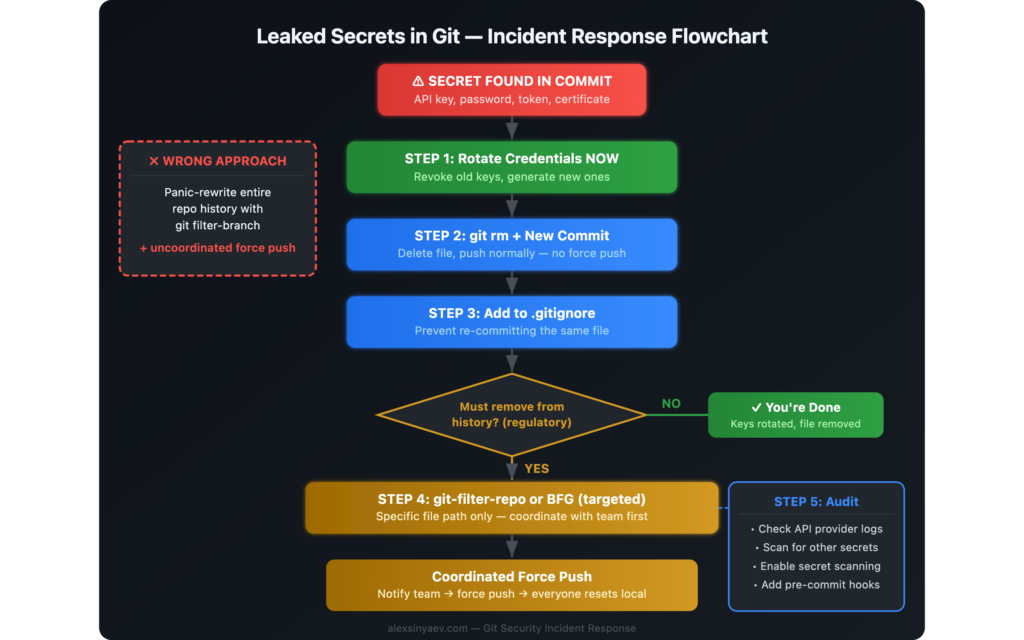
If you accidentally pushed secrets to Git, do not start by rewriting history. Start by rotating the exposed credentials, removing the file in a normal commit, and blocking the same mistake from happening again. That sequence neutralizes the real risk without breaking everyone else’s repository.
I once saw a team turn a manageable secret leak into a much bigger Git incident. A developer accidentally committed a config.json file with live API keys, then tried to “clean it properly” by rewriting the entire repository history and force-pushing it. The credentials issue was fixable. The history rewrite created a second incident.
This guide explains what happened, what we learned, and what to do if you committed an API key, token, password, or secret to GitHub, GitLab, Bitbucket, or any shared Git remote.
Quick answer: what to do if you committed secrets to Git
- Rotate or revoke the exposed secret immediately. This is the only step that reduces the real security risk.
- Remove the file or secret in a new commit. Do not panic-force-push to a shared branch.
- Add the file pattern to
.gitignore. Prevent the same secret from being committed again. - Audit access logs and related systems. Check whether the leaked credential was used.
- Only rewrite history if there is a strong reason. If you do, coordinate it carefully with the whole team.
How it started: credentials in a config file
It looked like a routine commit. A developer was working on a service integration and did not notice that a new config.json file contained live production API keys. The file was staged, committed, and pushed to the shared remote repository. Nobody caught it in review. The secret stayed in commit history, visible to anyone with repository access.
The problem was discovered a day later during a normal code review. Someone opened the file and immediately saw production credentials in plain text.
The panic response: “let’s clean the history”
The first reaction was understandable: remove the file from every commit so it could not be found in Git history. Someone found an old Stack Overflow answer recommending git filter-branch. That sounded responsible, but it was the wrong move for a shared repository under pressure.
The command was applied too broadly. Instead of targeting one file in a narrow range, it rewrote the entire repository history. Four years of commit hashes changed. Local repositories diverged from the remote. Then came the force push:
git push --force origin mainAt that point the team had two separate problems:
- The original secret exposure.
- A repository-wide history rewrite on a shared branch.
Why rewriting shared Git history is dangerous
Rewriting history on a branch other people use is disruptive even when done carefully. Doing it in a panic is how a security cleanup turns into an engineering outage.
- Broken local repositories. Everyone who already pulled the old commits now has a branch graph that no longer matches origin.
- Lost review context. Pull request discussions and code review references point to commit hashes that no longer exist.
- CI/CD disruption. Pipelines, cached artifacts, release markers, and deployment references may stop lining up with repository state.
- Harder debugging.
git blame,git bisect, and commit-based tracing become less reliable after unnecessary rewrites. - Recovery risk. If nobody still has the original refs locally, getting back to the prior state can become painful or impossible.
How we recovered
We got lucky. One teammate had not pulled after the force push and still had the original repository history with the correct commit hashes.
The recovery plan was simple but required coordination:
- We verified that the teammate’s local
mainmatched the last known good remote state. - They force-pushed that original history back to the remote.
- The rest of the team ran
git fetch originand reset local branches to the restored remote state. - We checked pull requests, CI pipelines, and deployment references to confirm they pointed at the correct commits again.
If that one untouched clone had not existed, the team would have had a much uglier decision: manually reconstruct history or live with the rewrite.
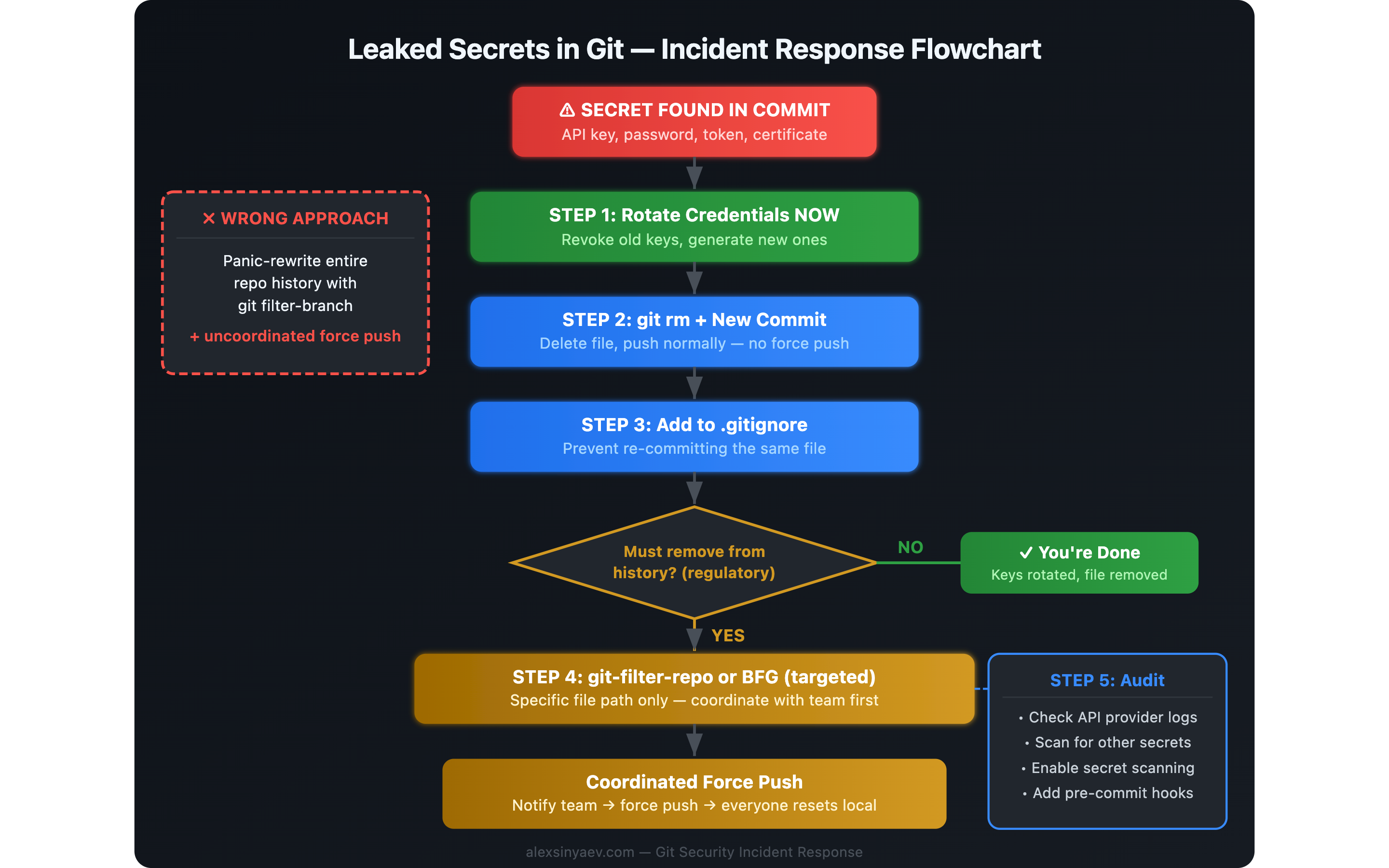
What to do instead when you accidentally push secrets to GitHub
After the postmortem, we documented a safer response process. This is the workflow I recommend now for most teams and most shared repositories.
Step 1: Rotate the credentials immediately
This is the non-negotiable first move. Revoke the leaked token, API key, password, SSH key, webhook secret, or cloud credential and replace it with a new one. If the credential grants broad access, also rotate related dependent secrets or sessions.
Important: removing a secret from Git does not make that secret safe again. Once it has been pushed, you must assume it was already copied, cached, or scraped.
Step 2: Remove the file or secret in a new commit
If the repository is shared, the default safe option is to fix the current state without rewriting old commits:
git rm config.json
git commit -m "Remove accidentally committed credentials file"
git push origin main
If the secret is inside a tracked file that must stay in the repo, edit the file, move the sensitive value to environment configuration, and commit that cleanup normally.
Step 3: Add a guardrail so it does not happen again
Add the file to .gitignore or restructure the code so secrets are loaded from environment variables or a secret manager:
echo "config.json" >> .gitignore
git add .gitignore
git commit -m "Ignore local credentials file"
git push origin main
Also consider committing a safe example file such as config.example.json or .env.example so developers know what shape the local config should have.
Step 4: Audit the blast radius
Once the secret is rotated and removed from the current branch, assess exposure:
- Check provider logs for suspicious API calls, sign-ins, or IP addresses.
- Review whether the repository was public, forked, mirrored, or exposed in CI logs.
- Search the repository for other hardcoded secrets.
- Verify whether the leaked credential had write access, admin access, billing scope, or production data scope.
- Document what was exposed, when it was rotated, and whether abuse was detected.
Step 5: Rewrite history only when there is a real requirement
Sometimes full cleanup is still justified. Common examples include public repositories, regulated environments, legal requirements, or high-impact credentials that were widely replicated. In those cases, plan the rewrite as a controlled maintenance operation, not as an emotional reaction.
If you must scrub history:
- Prefer git-filter-repo over
git filter-branch. - Target the exact file path or pattern that needs removal.
- Announce the rewrite window to everyone using the repository.
- Document the exact recovery steps for local clones, forks, CI, and deployment systems.
- Expect to force-push and expect cleanup work afterward.
# Remove one path from history with git-filter-repo
git filter-repo --invert-paths --path config.json

# Alternative: BFG Repo-Cleaner
bfg --delete-files config.json
BFG Repo-Cleaner is also a valid option for targeted cleanup, especially when you want a simpler interface for removing secrets or large files. The core point is not the tool choice. The core point is controlled execution and team coordination.
When not rewriting history is the better decision
Many teams overestimate the value of deleting the old commit and underestimate the cost of force-pushing rewritten history. If the secret has already been rotated, the immediate security risk is largely addressed. In a private shared repository, a standard forward-fix is often the best tradeoff.
That is why the practical order is:
- Neutralize the secret.
- Stabilize the repository.
- Decide whether historical cleanup is actually worth the disruption.
How to prevent accidental secret commits
The best response is to make this class of mistake harder in the first place.
Use .gitignore aggressively
Every repository should ignore common local secret files from day one:
.env
.env.*
config.json
*.pem
*.key
credentials.json
service-account.json
Use secret scanning before commit and on push
Pre-commit and CI scanning catch many leaks before they land in a shared remote. Common options include git-secrets, detect-secrets, and Gitleaks.
# Example: install and run Gitleaks as a pre-commit check
brew install gitleaks
gitleaks git --pre-commit
Enable GitHub secret scanning and push protection
GitHub can detect many known secret formats before or after they land in the repository. If you host code on GitHub, turn on secret scanning and, where available, push protection.
Store secrets outside the repository
Credentials should come from environment variables, platform secrets, or a dedicated secret manager rather than tracked files. Tools such as HashiCorp Vault, AWS Secrets Manager, and 1Password CLI make that manageable for teams.
Review staged changes before every commit
This habit catches more mistakes than most teams expect:
git diff --cached
git log -p -1
FAQ: accidentally committed secrets to Git
Is removing the file enough?
No. Removing the file from the latest commit or branch does not make the exposed secret safe. Rotate the secret first, then clean up the repository state.
Should I force-push after removing a secret?
Not by default. In a shared repository, force-pushing should be the exception, not the reflex. Most incidents are handled safely by rotating the credential and making a normal cleanup commit.
What if the repository is public?
Assume the secret was exposed immediately. Public repositories are actively scanned. Revoke the credential right away, audit access logs, and then decide whether historical cleanup is also required.
What tool should I use if history must be cleaned?
Use git-filter-repo or BFG Repo-Cleaner. Avoid git filter-branch for this kind of work unless you have a very specific reason and know exactly what you are doing.
Key takeaways
- Rotate first, clean second. The secret itself is the incident. Git history is a separate cleanup concern.
- Do not create a second incident. A rushed
git push --forcecan do more operational damage than the original mistake. - For shared repos, prefer a forward fix. Remove the file in a new commit, add protections, and keep the team unblocked.
- Rewrite history only with intent. If compliance, public exposure, or risk level requires it, use the right tool and coordinate the change.
- Prevention is cheap.
.gitignore, secret scanning, and better config handling prevent most of these leaks.
Security incidents are rarely defined by the original mistake alone. They are defined by the quality of the response. If your team can rotate quickly, communicate clearly, and avoid unnecessary Git damage, an accidental secret commit becomes a short-lived incident instead of a long cleanup project.
Related articles
- The Importance of Security in Web Development — why security must be a product requirement, not an afterthought.
- Debugging a Production Site After AI Deployment — another real-world incident walkthrough with practical debugging steps.
- Docker and WordPress — how containerized environments reduce configuration drift and environment-related mistakes.